
No photos recorded for this color yet
Apple Mac mini (M6 / M5 Pro)
Product ID: AKS-20261009-LTDZ
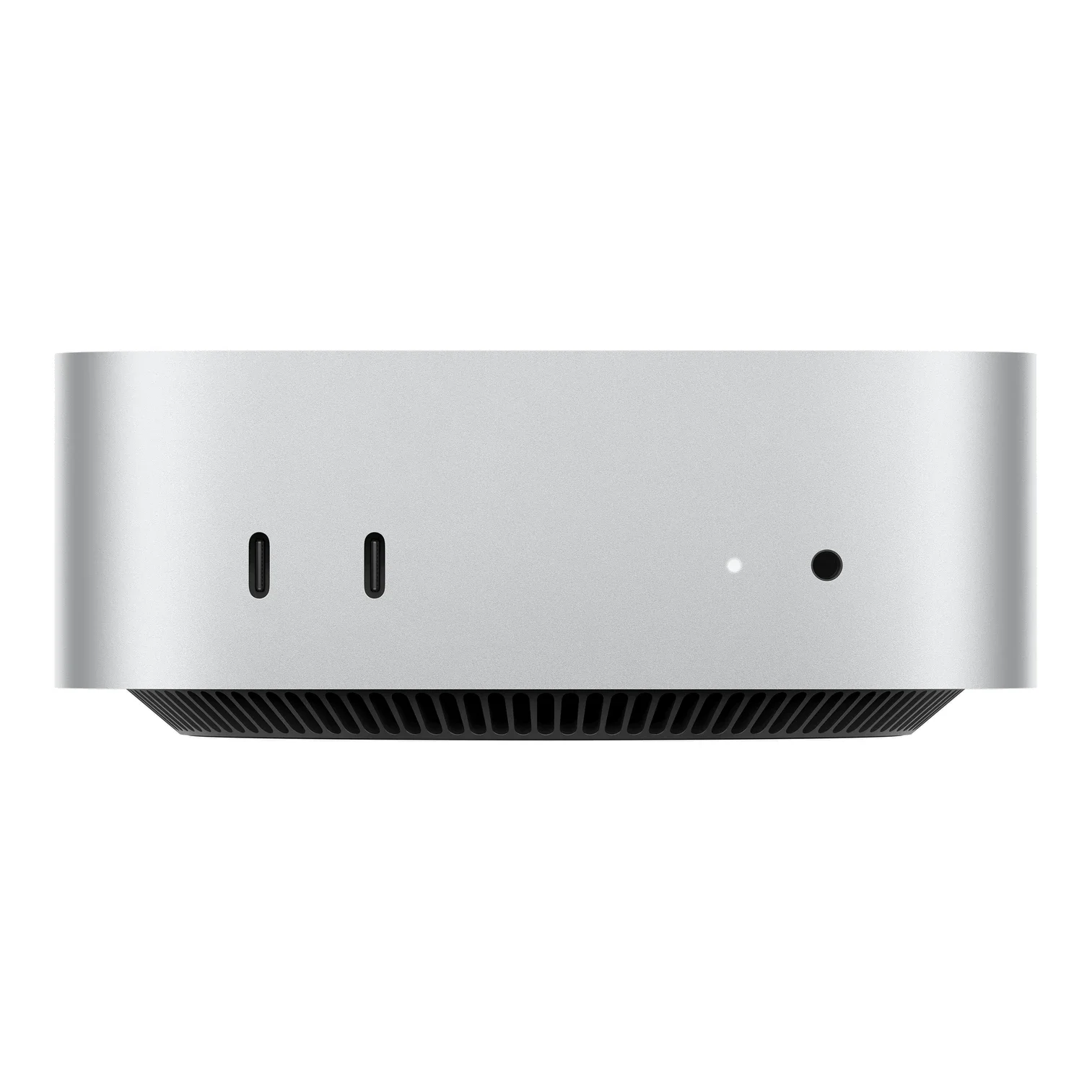
The Apple Mac mini (M6/M5 Pro) is Apple's smallest desktop Mac, refreshed in 2026, measuring 12.7×12.7×4.97cm in Silver. Choose Apple M6 (12-core CPU with 2 super, 4 performance and 6 efficiency cores; 12-core GPU; dual 16-core Neural Engine) or M5 Pro (15-core CPU/16-core GPU, or 18-core CPU/20-core GPU). The back has three Thunderbolt 4 (M6) or Thunderbolt 5 (M5 Pro) ports, HDMI and 2.5Gb Ethernet (10Gb optional); the front has two 10Gb/s USB-C ports and a 3.5mm headphone jack. Apple N1 provides Wi-Fi 7, Bluetooth 6 and Thread, with up to three external displays. Memory runs from 16GB to 64GB and SSD from 256GB to 8TB (maximums on M5 Pro); it weighs 0.67kg (M6) or 0.73kg (M5 Pro). Released 2026-09-22; from NT$29,900 on Apple Taiwan, with M5 Pro models from NT$59,900.
Saved temporarily in this device’s browser only. No long-term storage or syncing.
Official list prices
Pending and starting prices do not confirm the price of a specific variant. Check each market’s currency and tax status.
Taiwan (TW) · 1 TWD 29,900
-
Starting at
TWD 29,900 TW
Product price · Tax included
Official source · Checked
官方定價:NT$29,900 起
Product information
- Brand:
- Apple
- Category:
- Desktop computer
- Product line:
- Mac mini
- Release date:
- 2026-09-22
- Product ID:
- AKS-20261009-LTDZ
- Official information:
- View manufacturer page
- Last updated:
- Oct 31, 2026
Specifications
Body
- Width
- 127 mm
- Height
- 49.7 mm
- Depth
- 127 mm
Performance & system
- Processor
- Apple M6 (12-core CPU) or M5 Pro (15- or 18-core CPU)
- Graphics processor
- M6 12-core GPU; M5 Pro 16- or 20-core GPU
- Memory type
- Unified memory, 16GB–64GB (64GB on M5 Pro)
- Storage type
- SSD, 256GB–8TB (8TB on M5 Pro)
- Operating system
- macOS
- Form factor
- Compact desktop
Connectivity & compatibility
- Ports
- Back: 3× Thunderbolt 4 (M6) or Thunderbolt 5 (M5 Pro), HDMI, 2.5Gb Ethernet (10Gb optional); front: 2× USB-C (10Gb/s), 3.5mm jack
- Wireless connectivity
- Apple N1: Wi-Fi 7, Thread
- Bluetooth version
- 6
Battery & power
- Power supply rating
- 155 W
Product reviews
Based on 4 reviews
Based on a limited sample of reviews.
Snazzy Labs: Mac mini (M6/M5 Pro) Review — Extortionate Upgrade Taxes & Cramped I/O
Machine translated · Original language: Chinese (Taiwan) · Source language: Chinese (Taiwan)
Source
Snazzy Labs
Key Takeaways
- Soldered unified RAM and SSD keep Apple's upgrade extortion alive, charging hundreds of dollars for modest spec jumps.
- Shrunk rear chassis crowds port spacing; bulky HDMI plugs or thick thumb drives block adjacent Thunderbolt connections.
- Infamous bottom-mounted power button requires lifting the computer physically off the desk every time you turn it on.
- The tiny blower fan spins up with an audible high-frequency whir during long, continuous 3D rendering jobs.
✅ Pros
- Jaw-dropping silicon horsepower in an impossibly small box
- Tiniest desktop footprint clearing workspace clutter
- Convenient front-facing dual USB-C and audio ports
❌ Cons
- Highway robbery pricing for RAM/SSD upgrades
- Crowded rear I/O blocks adjacent bulky plugs
- Ridiculous bottom-mounted power button
- High-frequency blower fan pitch under load
📝 Verdict
"Mac mini delivers desktop brilliance ruined by Apple's predatory upgrade taxes and a baffling bottom power switch."
View original
Snazzy Labs:記憶體與硬碟加價依然黑心,背面接口間距過於擁擠
來源
Snazzy Labs
重點摘要
- 統一記憶體與固態硬碟依舊焊死在主機板上,從 16GB 升級到 32GB 記憶體原廠依然索取高達 200 到 400 美元的暴利黑心差價。
- 縮小後的緊湊機身背面接口間距極端擁擠,當插上較粗的 HDMI 線或外接隨身碟時,相鄰的 Thunderbolt 孔會被卡住無法插入。
- 電源按鈕被放置在機身正下方底部,每次開機或重置都必須伸手搬抬整台主機,設計令人匪夷所思。
- 在進行連續高負載 3D 渲染時,小型離心風扇加速旋轉發出明顯的高頻氣流風噪。
✅ 優點
- M6 與 M5 Pro 狂暴運算能效兼備
- 極致小巧如便當盒般的桌面佔用空間
- 前方新增快捷雙 USB-C 與耳機孔好插好用
❌ 缺點
- 暴利黑心的記憶體硬碟升級選配定價
- 背面接口過度密集互相干涉卡住
- 底部反人類的開機電源按鍵
- 高負載下小型風扇有高頻氣流聲
📝 總結評語
「Mac mini 效能體積比冠絕全球,但黑心升級選配定價與反人類的底部電源鍵,依舊是果粉心中的刺。」
This AI-generated summary is based on the original source and was not written by its creator. It may contain errors or omissions; please consult the original source.
Kyle Erickson: Speed isn't the M6 Mac mini's problem — price is
Machine translated · Original language: Chinese (Taiwan)
Source
- Video: 1 Week with the Mac Mini M6: Speed Isn't The Problem...
- Channel: Kyle Erickson | Type: One-week review | Based on: YouTube transcript (fetched with youtube-transcript-api)
Key points
- The Mac mini has always been the easiest way into macOS, and is often used as a media center, home server or AI assistant; but the M6 version starts at $899, much more than the $599 M4 version from less than a year ago.
- He needs at least 512GB, which costs $1,099 after the upgrade — about the same as a similarly configured refurbished M5 MacBook Air, and $300 more than the M4 mini of six months ago.
- Benchmarks: compared with the M5, the M6 is about 10% faster single-core, about 22% faster multi-core and about 17% faster on GPU; compared with the M5 Pro, it leads in single-core but is about 26% slower multi-core and 31% slower on GPU; SSD speed is about double the M4 mini's, though hard to notice in practice.
- Real-world tests: Xcode compiles 43% faster than the M5 (about 20% slower than the M5 Pro); Blender renders 30% faster; Final Cut Pro exports are only about 15% faster, since the three chips' media engines are nearly identical. Wi-Fi and Bluetooth 6 are stable.
- After a week he almost forgot he wasn't using a Mac Studio, only feeling the gap during rendering and stress tests. If it were still $799 he'd recommend it without hesitation; at the current price, adding a keyboard, mouse and monitor makes it more expensive than a similarly configured MacBook Air. The M5 Pro version, by contrast, saves about $500 over a similarly configured MacBook Pro, making it better value.
✅ Pros
- Solid performance for daily and creative work
- Clear gains in Xcode and Blender
- Stable Wi-Fi and Bluetooth 6
- The M5 Pro version is relatively good value
❌ Cons
- A big jump in starting price
- At 512GB and up, the price approaches the MacBook Air
- Limited improvement in Final Cut Pro exports
📝 Verdict
A great machine whose value has become murky: if you simply love the Mac mini form factor and your budget allows, you won't be disappointed, but at today's price it's no longer the no-brainer recommendation it used to be.
View original
Kyle Erickson:M6 Mac mini 速度不是問題,價格才是
來源
- 影片:1 Week with the Mac Mini M6: Speed Isn't The Problem...
- 頻道:Kyle Erickson|類型:使用一週評測|摘要依據:YouTube 字幕逐字稿(youtube-transcript-api 擷取)
重點摘要
- Mac mini 一直是進入 macOS 最容易的入口,也常被拿來當媒體中心、家用伺服器或 AI 助理;但 M6 版起價 899 美元,比不到一年前 599 美元的 M4 版貴很多。
- 他至少需要 512GB,升級後要 1,099 美元,與同規格整新 M5 MacBook Air 相當,比半年前的 M4 mini 貴 300 美元。
- 跑分:M6 相較 M5 單核約快 10%、多核約快 22%、GPU 約快 17%;與 M5 Pro 相比單核領先但多核約慢 26%、GPU 慢 31%;SSD 速度約為 M4 mini 的兩倍,但實際使用不易察覺。
- 實務測試:Xcode 編譯比 M5 快 43%(比 M5 Pro 慢約 20%);Blender 算繪快 30%;Final Cut Pro 匯出僅快約 15%,因為三款晶片的媒體引擎幾乎相同。Wi-Fi 與藍牙 6 表現穩定。
- 一週下來幾乎忘了自己沒用 Mac Studio,只有算繪與壓力測試時才感受到差距。若仍是 799 美元他會毫不猶豫推薦;以現價來說,加上鍵盤、滑鼠與螢幕會比同規格 MacBook Air 更貴。M5 Pro 版則比同規格 MacBook Pro 省約 500 美元,較有價值。
✅ 優點
- 日常與創作效能扎實
- Xcode 與 Blender 進步明顯
- Wi-Fi 與藍牙 6 穩定
- M5 Pro 版相對划算
❌ 缺點
- 起價大幅上漲
- 512GB 以上價格接近 MacBook Air
- Final Cut Pro 匯出進步有限
📝 總結評語
機器很好,價值變模糊:若你就是喜歡 Mac mini 的形式且預算允許不會失望,但以現在的價格,它不再是過去那個無腦推薦的選擇。
This AI-generated summary is based on the original source and was not written by its creator. It may contain errors or omissions; please consult the original source.
Mark Ellis: Running AI locally and offline on the M6 Mac mini is quiet and reassuring
Machine translated · Original language: Chinese (Taiwan)
Source
- Video: M6 Mac mini Review: This Changes Everything
- Channel: Mark Ellis Reviews | Type: Practical use review (M6, 32GB, 2TB, local AI) | Based on: YouTube transcript (fetched with youtube-transcript-api)
Key points
- His team normally uses cloud AI for planning, research and reports, and this time tried moving that work offline onto the M6 Mac mini. The test unit has an M6 (12-core CPU, 12-core GPU, 16-core Neural Engine), 32GB of unified memory and a 2TB SSD.
- Using a llama server to load local models for research and planning, everything was done fully offline; the machine neither got hot nor made fan noise, and although memory pressure was high and about 20GB of swap was used, the system stayed responsive.
- Offline transcription of video subtitles with MacWhisper (Parakeet V3 model) went smoothly; generating one image with Flux 1 Schnell in Draw Things took about 53 seconds.
- He stresses that not having to upload data to someone else's servers or pay token fees brings a peace of mind that's hard to describe; the M4 version can do the same work, but the M6 has more headroom.
- He admits he isn't an expert and is learning as he goes, and teases a larger-scale comparison using an M5 Ultra Mac Studio.
✅ Pros
- Runs local AI offline in a small body
- Stays quiet and cool under heavy load
- Very practical with upgraded memory
❌ Cons
- Memory pressure is still high with 32GB when running large models
- Expensive once fully specced
📝 Verdict
A good entry point for local AI: an M6 Mac mini with upgraded memory can quietly handle research, transcription and image generation offline, suiting small teams that want to break their dependence on the cloud.
View original
Mark Ellis:用 M6 Mac mini 在本機離線跑 AI,安靜又讓人安心
來源
- 影片:M6 Mac mini Review: This Changes Everything
- 頻道:Mark Ellis Reviews|類型:實務應用評測(M6、32GB、2TB 本地 AI)|摘要依據:YouTube 字幕逐字稿(youtube-transcript-api 擷取)
重點摘要
- 他的團隊平常用雲端 AI 做企劃、研究與報告,這次嘗試把這些工作搬到 M6 Mac mini 上離線執行。測試機為 M6(12 核心 CPU、12 核心 GPU、16 核心神經網路引擎)、32GB 統一記憶體與 2TB SSD。
- 以 llama 伺服器載入本地模型做研究與企劃整理,全程離線完成;機器既不燙、風扇也沒聲音,雖然記憶體壓力高、使用了約 20GB 交換空間,但系統仍可回應。
- 用 MacWhisper(Parakeet V3 模型)離線轉錄影片字幕順利;用 Draw Things 載入 Flux 1 Schnell 生成一張圖約 53 秒。
- 他強調資料不必上傳到別人的伺服器,也不必付 token 費用,這種安心感很難形容;同樣工作 M4 版也能做,但 M6 更有餘裕。
- 他自認不是專家,邊學邊做,並預告會用 M5 Ultra Mac Studio 做更大規模的比較。
✅ 優點
- 小機身即可離線執行本地 AI
- 高負載仍安靜、不發燙
- 記憶體升級後實用性高
❌ 缺點
- 32GB 跑大模型時記憶體壓力仍高
- 規格加滿後價格不低
📝 總結評語
本地 AI 的好入口:升級記憶體的 M6 Mac mini 能安靜地離線處理研究、轉錄與生圖,適合想擺脫雲端依賴的小團隊。
This AI-generated summary is based on the original source and was not written by its creator. It may contain errors or omissions; please consult the original source.
The Tech Chap: The M6 Mac mini's performance approaches the M4 Pro, but the price rises to $899
Machine translated · Original language: Chinese (Taiwan)
Source
- Video: Mac Mini M6 Review - HOW MUCH!?
- Channel: The Tech Chap | Type: Hands-on review (base M6 with added memory) | Based on: YouTube transcript (fetched with youtube-transcript-api)
Key points
- It looks the same as the previous generation, still a small box of about 5×5 inches; this is the debut of the M6 chip, with a higher-end version using the M5 Pro also available. He demonstrates it still running while simultaneously playing a 4K Premiere Pro timeline, rendering in Blender and generating AI images.
- Price is the biggest issue: the M4 version originally started at $599, earlier this year the base model moved to 512GB and rose to $799, and the M6 version goes back to 256GB but costs $899 — about 50% more.
- Spec upgrades: about 20% more CPU and GPU cores each, a Neural Accelerator in every GPU core, and higher memory bandwidth and base SSD speeds (up to about double); the N1 chip brings Wi-Fi 7 and Bluetooth 6, and Ethernet goes from 1Gb to 2.5Gb (10Gb optional). The power button is still on the bottom, a slightly odd location.
- His benchmarks (Geekbench, Cinebench, 3DMark, Blender and local AI) show that although the M6 is pricier, it comes very close to the previous generation's high-end M4 Pro.
- If you can find an M4 Mac mini, he suggests considering it; if you need a real workstation, look at the Mac Studio. Overall the M6 version is pricier but much more powerful, and remains one of his favorite Apple products, still highly recommended.
✅ Pros
- Performance approaches the previous-generation M4 Pro
- Wi-Fi 7, Bluetooth 6 and 2.5Gb Ethernet
- Compact with good build quality
- Faster base SSD
❌ Cons
- Starting price rises to $899
- Base model goes back to 256GB
- The power button is still on the bottom
📝 Verdict
Pricier but more powerful: the M6 Mac mini is still one of the cutest and most practical desktops, just no longer the cheap entry-level Mac it once was.
View original
The Tech Chap:M6 Mac mini 效能逼近 M4 Pro,但售價漲到 899 美元
來源
- 影片:Mac Mini M6 Review - HOW MUCH!?
- 頻道:The Tech Chap|類型:上手評測(M6 基本款附加記憶體)|摘要依據:YouTube 字幕逐字稿(youtube-transcript-api 擷取)
重點摘要
- 外觀與上一代相同,仍是約 5×5 吋的小方盒;這是 M6 晶片首次登場,另有搭載 M5 Pro 的高階版本。他示範同時播放 4K Premiere Pro 時間軸、Blender 算繪與 AI 生圖仍能運作。
- 價格是最大問題:M4 版當初 599 美元起,今年初改以 512GB 為基本款並漲到 799 美元,M6 版回到 256GB 卻要 899 美元,約貴了 50%。
- 規格升級:CPU 與 GPU 核心數各多約 20%,每個 GPU 核心都有神經加速器,記憶體頻寬與基本款 SSD 速度提升(最高約兩倍);N1 晶片帶來 Wi-Fi 7 與藍牙 6,乙太網路從 1Gb 提升到 2.5Gb(可加購 10Gb)。電源鍵仍在底部,位置有點怪。
- 他的跑分(Geekbench、Cinebench、3DMark、Blender 與本地 AI)顯示 M6 雖然較貴,但已非常接近上一代高階的 M4 Pro。
- 若找得到 M4 Mac mini,他建議考慮;需要真正工作站則看 Mac Studio。整體而言 M6 版更貴但強很多,仍是他最喜歡的 Apple 產品之一,依然高度推薦。
✅ 優點
- 效能逼近上一代 M4 Pro
- Wi-Fi 7、藍牙 6 與 2.5Gb 乙太網路
- 體積小巧、做工好
- 基本款 SSD 速度提升
❌ 缺點
- 起價漲至 899 美元
- 基本款回到 256GB
- 電源鍵仍在底部
📝 總結評語
更貴但更強:M6 Mac mini 仍是最可愛也最實用的桌機之一,只是不再是過去那台便宜的入門 Mac。
This AI-generated summary is based on the original source and was not written by its creator. It may contain errors or omissions; please consult the original source.