
No photos recorded for this color yet
Dell XPS 13 (2026)
Product ID: AKS-20261011-4GRU
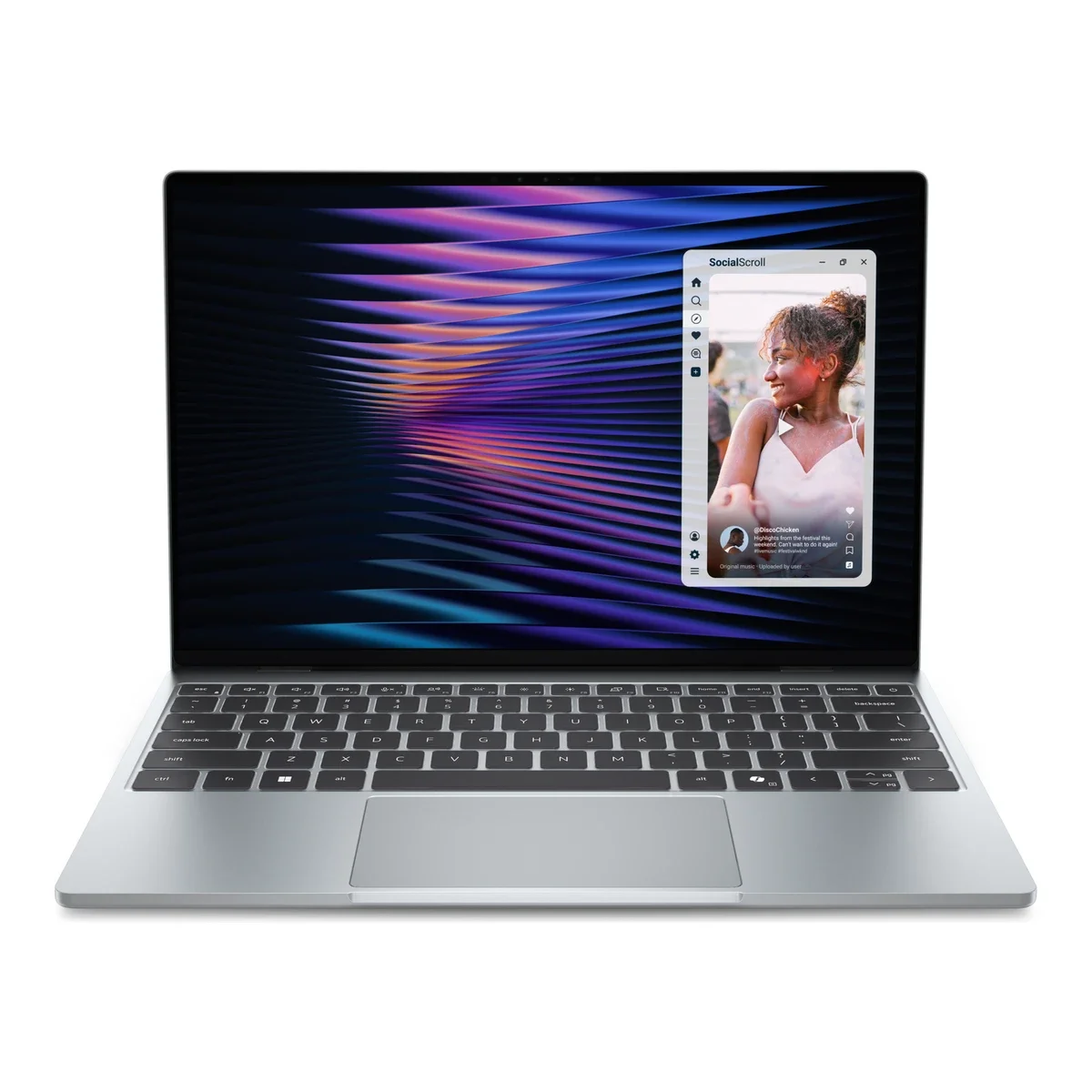
The Dell XPS 13 (2026) is Dell's relaunched XPS 13 (model DX13260) and the most affordable XPS yet: a 12.75mm, roughly 1kg CNC-aluminum chassis makes it the thinnest and lightest XPS ever. A 13.4-inch 2.5K touch display (30–120Hz VRR, 500 nits), backlit keyboard, Windows Hello IR camera and Wi-Fi 7 are standard. Entry models use the Intel Core 5 320 (Wildcat Lake) with 8GB RAM for everyday browsing, office work and students; Core Ultra 7 355 (Panther Lake) models add dual Thunderbolt 4 and up to 32GB/1TB. It has a 52Wh battery and just two USB-C ports. On sale in the US from June, starting at US$699 (US$599 for students).
Saved temporarily in this device’s browser only. No long-term storage or syncing.
Official list prices
Pending and starting prices do not confirm the price of a specific variant. Check each market’s currency and tax status.
United States (US) · 1 USD 699
-
Starting at
USD 699 US
Product price · Tax excluded
Official source · Checked
美國官方定價:$699 起
Product information
- Brand:
- Dell
- Category:
- Laptop
- Product line:
- XPS
- Release date:
- 2026-06-16
- Product ID:
- AKS-20261011-4GRU
- Official information:
- View manufacturer page
- Last updated:
- Oct 31, 2026
Specifications
Body and display
- Width
- 296.9 mm
- Depth
- 200.7 mm
- Minimum height
- 12.75 mm
- Maximum height
- 12.75 mm
- Weight
- 1 kg
- Display count
- 1
- Display size
- 13.4 in
- Display resolution
- 2560 × 1600
- Display technology
- 2.5K InfinityEdge touch LCD (30–120Hz variable refresh, 500 nits, 100% DCI-P3)
- Refresh rate
- 120 Hz
- Touchscreen
- Yes
Performance and storage
- Operating system
- Windows
- Processor
- Intel Core 5 320 (Core Series 3) or Intel Core Ultra 7 355 (Core Ultra Series 3), by configuration
- Graphics
- Intel integrated graphics (by processor)
- Memory type
- LPDDR5x (8/16/32GB options; 32GB on Core Ultra models only)
- Storage type
- PCIe Gen4 NVMe SSD (256GB–1TB options, varies by region)
Power and connectivity
- Battery capacity
- 52 Wh
- Ports
- 2× USB-C (USB 3.2 Gen 2 on Core models, Thunderbolt 4 on Core Ultra models), both with DisplayPort 2.1 and Power Delivery 3.1 charging; no card reader
- Wireless
- Intel Wi-Fi 7 BE213 2×2; Bluetooth 6.0
- Camera
- FHD 1080p30 RGB camera + IR camera (Windows Hello)
- Color
- Sky / Storm
Product reviews
Based on 4 reviews
Based on a limited sample of reviews.
Dave2D: Dell XPS 13 (2026) Review — Invisible Trackpad Misery & Capacitive Keys
Machine translated · Original language: Chinese (Taiwan) · Source language: Chinese (Taiwan)
Source
Dave2D
Key Takeaways
- Completely seamless glass palm rest provides zero tactile boundary for the trackpad, causing endless missed clicks.
- Capacitive touch function row offers zero physical haptic feedback, making touch-typing Esc or media keys miserable.
- Only two USB-C ports on the entire laptop with no 3.5mm headphone jack, mandating an annoying dongle pouch.
- Zero-lattice flat keycaps with virtually no key spacing lead to dramatically higher typing typo rates.
✅ Pros
- Ultra-futuristic, clean seamless aesthetics
- Stunning high-resolution OLED with razor-thin bezels
- Incredibly thin, light and premium chassis
❌ Cons
- Boundaryless invisible touchpad induces mis-clicks
- Mushy, haptic-less capacitive function row
- Stripped to only 2 USB-C ports with no headphone jack
- Zero-lattice keyboard increases typo frequency
📝 Verdict
"Dell XPS 13 prioritizes sci-fi looks over human ergonomics: invisible trackpads and touch bars ruin the workflow."
View original
Dave2D:隱形觸控板是盲打噩夢,電容觸控功能鍵與極度匱乏的接口
來源
Dave2D
重點摘要
- 整塊玻璃掌托完全沒有觸控板邊界紋理,盲操時手指頻繁滑出有效感應區域導致游標丟失與誤點擊。
- 頂部電容觸控功能鍵完全沒有任何觸覺回饋,敲擊 Esc 或音量鍵時經常無感,盲打體驗徹底崩潰。
- 全機身僅有可憐的兩個 Type-C 接口,連耳機孔都被拔除,外出必須隨身攜帶擴充轉接器。
- 鍵盤無縫零網格鍵帽鍵程極淺且邊緣無間隙,打字錯誤率比傳統孤島鍵盤高出數倍。
✅ 優點
- 極致前衛未來感的無縫極簡外觀
- 極窄邊框高解析 OLED 螢幕色彩驚艷
- 機身極其纖薄輕巧方便隨身攜帶
❌ 缺點
- 毫無邊界的隱形觸控板極易誤觸丟失
- 缺少觸覺回饋的電容觸控快捷鍵
- 僅有 2 個 Type-C 連耳機孔都拔除
- 無縫鍵盤誤打率居高不下
📝 總結評語
「Dell XPS 13 為了設計美感犧牲了所有的人體工學,隱形觸控板與觸控鍵讓日常辦公變成折磨。」
This AI-generated summary is based on the original source and was not written by its creator. It may contain errors or omissions; please consult the original source.
Lon.TV: The XPS 13 is better built than the MacBook Neo, and the 16GB version is the best pick
Machine translated · Original language: Chinese (Taiwan)
Source
- Video: Dell XPS 13 Review - A Great Affordable* MacBook Neo Alternative ! (by 2026 standards)
- Channel: Lon.TV | Type: Full review (16GB version loaned by Dell, not sponsored) | Based on: YouTube transcript
Key points
- Loaned by Dell, not sponsored; he recommends spending US$200 more on the 16GB version for smoother multitasking and light editing.
- All metal, about 1kg, and the lid opens with one hand; every model comes standard with a 2560×1600 matte IPS touchscreen with a 30–120Hz variable refresh rate and 500 nits, supporting HDR and Dolby Vision.
- The memory is soldered and not upgradable, but the 512GB SSD is replaceable; the keyboard is roomy, feels better than expected and is backlit, and the touchpad is mechanical.
- No fingerprint reader — it relies on Windows Hello face unlock; the 1080p30 camera is grainy with no physical shutter; the speakers' volume and sound quality are surprisingly good.
- There's just one 10Gbps USB-C port on each side (no Thunderbolt support), but both can charge and output video.
- It scored 98.6% stability in the 3DMark stress test at about 53°C with the fan barely audible; graphics performance is slightly behind the MacBook Neo, and under Ubuntu audio and Wi-Fi don't work yet.
✅ Pros
- Better built than the MacBook Neo
- Matte touchscreen, 120Hz
- Good-sounding speakers; quiet, stable cooling
- 16GB option, replaceable SSD
❌ Cons
- Only two USB-C ports
- No fingerprint reader, mediocre camera
- Soldered memory
📝 Verdict
An excellent Windows laptop: it still offers great value amid rising component prices; he notes Dell has hinted at possible price increases later.
View original
Lon.TV:XPS 13 做工比 MacBook Neo 更高級,16GB 版是最佳選擇
來源
- 影片:Dell XPS 13 Review - A Great Affordable* MacBook Neo Alternative ! (by 2026 standards)
- 頻道:Lon.TV|類型:完整評測(Dell 借測 16GB 版,非贊助)|摘要依據:YouTube 字幕逐字稿
重點摘要
- Dell 借測、非贊助;他建議多花 US$200 選 16GB 版,多工與輕度剪輯會更順。
- 全金屬、約 1kg,單手可開蓋;全系列標配 2560×1600 霧面 IPS 觸控螢幕,30–120Hz 可變更新率、500 尼特,支援 HDR 與 Dolby Vision。
- 記憶體焊死不可升級,但 512GB SSD 可更換;鍵盤寬敞、手感比預期好且有背光,觸控板為機械式。
- 沒有指紋辨識,靠 Windows Hello 臉部解鎖;1080p30 鏡頭偏顆粒、沒有實體遮罩;喇叭音量與音質意外地好。
- 只有左右各一個 10Gbps USB-C(不支援 Thunderbolt),但都能充電與輸出畫面。
- 3DMark 壓力測試穩定度 98.6%,溫度約 53°C、幾乎聽不到風扇;圖形效能略輸 MacBook Neo,Ubuntu 下音效與 Wi-Fi 暫不可用。
✅ 優點
- 做工比 MacBook Neo 更高級
- 霧面觸控螢幕、120Hz
- 喇叭好聽、散熱安靜穩定
- 可選 16GB、SSD 可換
❌ 缺點
- 連接埠只有兩個 USB-C
- 沒有指紋辨識、鏡頭普通
- 記憶體焊死
📝 總結評語
很出色的 Windows 筆電:在零組件漲價的環境下仍給出很高的價值;他提醒 Dell 已暗示之後可能漲價。
This AI-generated summary is based on the original source and was not written by its creator. It may contain errors or omissions; please consult the original source.
Just Josh: The XPS 13 is the best laptop at this price — top-notch build and screen, but performance is only enough for the basics
Machine translated · Original language: Chinese (Taiwan)
Source
- Video: Dell Finally Did It… The XPS 13 Is Fantastic!
- Channel: Just Josh | Type: Full review (tested both 8GB and 16GB units) | Based on: YouTube transcript
Key points
- They see the XPS 13 as a Windows MacBook Neo: it brings premium build quality to the US$699 price point (US$599 for students), with a backlit keyboard, a larger touchscreen and a lighter body.
- The 2560×1600 IPS touchscreen reaches about 500 nits with nearly 100% P3 and good anti-reflection, making it suitable outdoors; up to 120Hz, but no stylus support.
- The keyboard has only 0.8mm of travel and bottoms out easily, but it's very quiet, and the physical function row is finally back; the mechanical touchpad performs fine.
- Just two 10Gbps USB-C ports (both can charge and output video), with no USB-A or headphone jack, which will limit many people; the speakers lack bass and are over-processed.
- The Core 5 320 performs roughly on par with the MacBook Neo and is only suited to basic tasks like browsing and Office; the 8GB version starts slowing down at about 24 tabs, while the 16GB version handles about 60.
- Office battery life is about twice the MacBook Neo's; the SSD (2230) and battery are replaceable, but the Wi-Fi 7 card is soldered and only supports 160MHz; under Ubuntu / Fedora, Wi-Fi and the speakers don't work.
✅ Pros
- Premium aluminum build that's rare at this price, and lightweight
- 2.5K 120Hz touchscreen with accurate colors, great outdoors
- Very long battery life with almost no fan noise
- Backlit keyboard and Windows Hello
❌ Cons
- Processor performance only suits basic use
- Only two USB-C ports, no USB-A or headphone jack
- Speakers lack bass; shallow key travel
- 8GB is tight on Windows
📝 Verdict
The best laptop at this price, but only for the right buyer: highly recommended if you're sure you only need documents and browsing; anyone who may need more performance later (a change of major, video editing) should look at Core Ultra or Snapdragon models instead.
View original
Just Josh:XPS 13 是這個價位最好的筆電——做工、螢幕一流,但效能只夠基本使用
來源
- 影片:Dell Finally Did It… The XPS 13 Is Fantastic!
- 頻道:Just Josh|類型:完整評測(8GB 與 16GB 兩台實測)|摘要依據:YouTube 字幕逐字稿
重點摘要
- 他們認為 XPS 13 就像 Windows 版的 MacBook Neo:把高級做工帶進 US$699(學生 US$599)價位,而且有背光鍵盤、更大的觸控螢幕、更輕的機身。
- 2560×1600 IPS 觸控螢幕約 500 尼特、近 100% P3,抗反射效果好、適合戶外;最高 120Hz,但不支援觸控筆。
- 鍵盤鍵程僅 0.8mm、容易打到底,但很安靜,且終於回歸實體 F 列;觸控板為機械式,表現正常。
- 只有兩個 10Gbps USB-C(皆可充電與輸出畫面),沒有 USB-A 與耳機孔,對很多人會是限制;喇叭缺乏低音、處理過度。
- Core 5 320 效能約與 MacBook Neo 相當,只適合上網、Office 等基本用途;8GB 版約 24 個分頁開始變慢,16GB 版可撐到約 60 個。
- 辦公續航約為 MacBook Neo 的兩倍;SSD(2230)與電池可更換,但 Wi-Fi 7 網卡焊死且只支援 160MHz;Ubuntu/Fedora 下 Wi-Fi 與喇叭無法使用。
✅ 優點
- 同價位少見的高級鋁合金做工、輕巧
- 2.5K 120Hz 觸控螢幕色彩準確、戶外好用
- 續航很長、幾乎無風扇噪音
- 有背光鍵盤與 Windows Hello
❌ 缺點
- 處理器效能僅適合基本用途
- 只有兩個 USB-C,缺 USB-A 與耳機孔
- 喇叭沒低音、鍵程淺
- 8GB 在 Windows 下吃緊
📝 總結評語
這個價位最好的筆電,但要買對人:確定只需要文書上網就很推薦;之後可能需要更多效能(換科系、影片剪輯)的人,應改看 Core Ultra 或 Snapdragon 機型。
This AI-generated summary is based on the original source and was not written by its creator. It may contain errors or omissions; please consult the original source.
Notebookcheck: The XPS 13 delivers a flagship experience at an entry-level price (sponsored video, early hands-on with a pre-production unit)
Machine translated · Original language: Chinese (Taiwan)
Source
- Video: A premium laptop for a budget price! - Dell XPS 13
- Channel: NotebookcheckReviews | Type: Early hands-on (sponsored by Dell, pre-production sample) | Based on: YouTube transcript
Key points
- The video is clearly labeled as sponsored by Dell; it uses a pre-production sample, and full measurements will have to wait for the formal review.
- The Core 5 320 is an entry-level Intel 18A processor with 2P+4LPE cores; configurations start at 8GB / 512GB and go up to 32GB / 1TB, and the SSD is user-replaceable.
- A matte QHD+ touchscreen with a 30–120Hz variable refresh rate and full DCI-P3 coverage comes standard, a spec he says is usually found only on pricier machines.
- The all-metal chassis is solid without flex, the hinge is stable, the keyboard feel and speakers are good, and it weighs slightly over 1kg.
- The entry model's two USB-C ports are 3.2 Gen 2, with Thunderbolt 4 only on Panther Lake models; connecting a 34-inch monitor and peripherals through an adapter still worked fine.
- It handles everyday multi-tab browsing, light photo editing and light games like Hades; under full load the fan is audible but not intrusive, and the chassis stays cool; Dell's official battery target is about 18 hours of Netflix.
✅ Pros
- Build and looks far exceed the price
- High-spec touchscreen
- Replaceable SSD
- Quiet, with good thermal control
❌ Cons
- 8GB in the entry configuration is on the low side
- No Thunderbolt on the entry model
- Not suited to gaming or heavy creative work
📝 Verdict
Redefining the premium experience at this price: not for gamers or heavy creators, but great as a reliable, lightweight all-day everyday laptop. (Video sponsored by Dell; the sample is a pre-production unit)
View original
Notebookcheck:XPS 13 以入門價格提供旗艦級體驗(贊助影片、工程機初步上手)
來源
- 影片:A premium laptop for a budget price! - Dell XPS 13
- 頻道:NotebookcheckReviews|類型:初步上手(Dell 贊助、量產前樣機)|摘要依據:YouTube 字幕逐字稿
重點摘要
- 影片明確標示由 Dell 贊助;使用的是量產前樣機,完整量測要等正式評測。
- Core 5 320 為 2P+4LPE 的入門款 Intel 18A 處理器,8GB/512GB 起,最高可選 32GB/1TB,而且 SSD 可自行更換。
- 標配 QHD+ 30–120Hz 可變更新率、全 DCI-P3 的霧面觸控螢幕,他認為是更貴機種才有的規格。
- 全金屬機身扎實不彎、螺軸穩定,鍵盤手感與喇叭都不錯,重量略超過 1kg。
- 入門款兩個 USB-C 為 3.2 Gen 2,Panther Lake 機型才升級 Thunderbolt 4;他用轉接器連接 34 吋螢幕與周邊仍運作正常。
- 日常多分頁、輕度修圖與《Hades》等輕量遊戲都可以;滿載時聽得到風扇但不擾人,機身保持涼爽;Dell 官方續航目標約 18 小時 Netflix。
✅ 優點
- 做工與外觀遠超售價
- 高規格觸控螢幕
- SSD 可更換
- 安靜、溫度控制好
❌ 缺點
- 8GB 入門配置偏少
- 入門款沒有 Thunderbolt
- 不適合遊戲與重度創作
📝 總結評語
重新定義這個價位的高級體驗:不是給玩家或重度創作者,但很適合作為可靠、輕巧的全天候日常筆電。(Dell 贊助影片,樣機為量產前版本)
This AI-generated summary is based on the original source and was not written by its creator. It may contain errors or omissions; please consult the original source.