
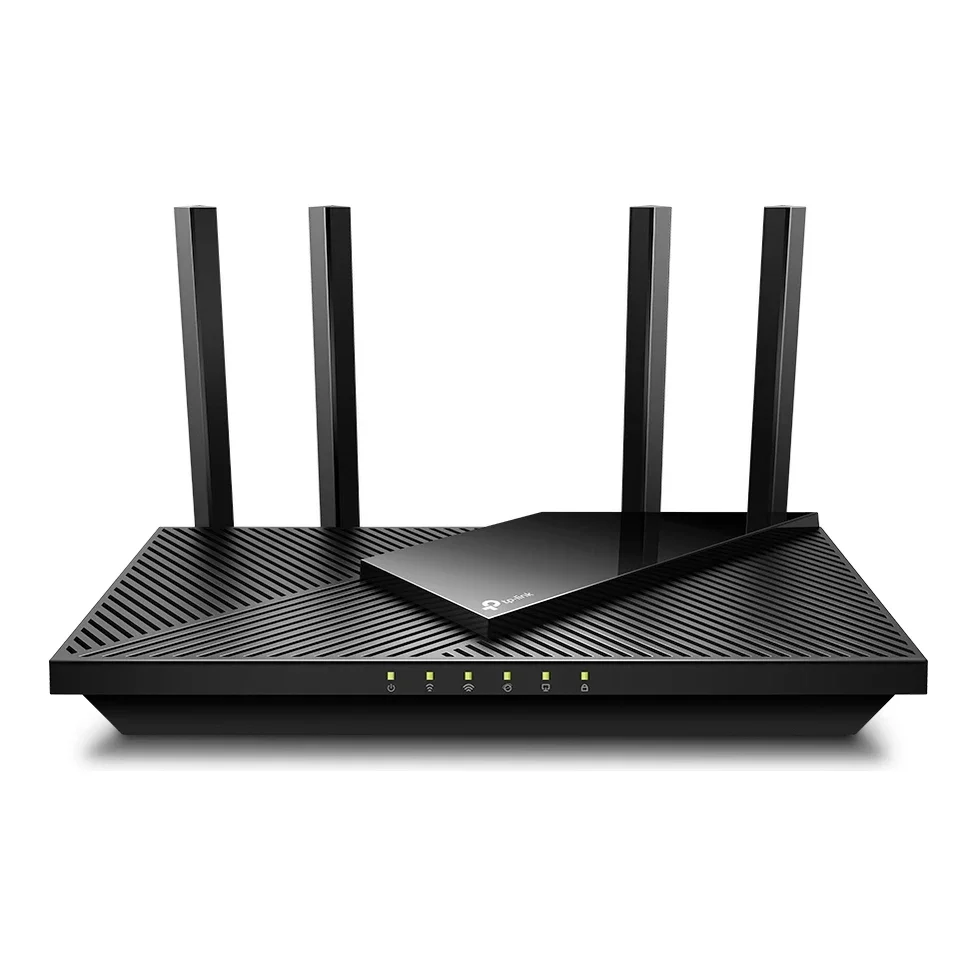
No photos recorded for this color yet
TP-Link Archer AX21 (AX1800 Dual-Band Wi-Fi 6 Router)
Product ID: AKS-20261017-HJP5
The TP-Link Archer AX21 is a budget Wi-Fi 6 router that sat on Amazon and other bestseller lists for years. It is AX1800 dual-band (1201Mbps on 5GHz + 574Mbps on 2.4GHz), with four external antennas, one Gigabit WAN and four Gigabit LAN ports, WPA3 and TP-Link OneMesh. It is also a security-news regular: firmware flaw CVE-2023-1389 was widely exploited by Mirai and other botnets, and US CISA added it to its Known Exploited Vulnerabilities catalog in 2023 (TP-Link has released patched firmware). From late 2024 the US government investigated TP-Link and weighed restricting sales (The Wall Street Journal).
Saved temporarily in this device’s browser only. No long-term storage or syncing.
Official list prices
Pending and starting prices do not confirm the price of a specific variant. Check each market’s currency and tax status.
No verified official price available
Product information
- Brand:
- TP-Link
- Category:
- Routers & mesh systems
- Product line:
- Archer
- Release date:
- 2020 (year only)
- Product ID:
- AKS-20261017-HJP5
- Official information:
- View manufacturer page
- Last updated:
- Oct 29, 2026
Specifications
Body
- Width
- 261.1 mm
- Height
- 41 mm
- Depth
- 134.5 mm
Connectivity & compatibility
- Wi-Fi standard
- Wi-Fi 6 (802.11ax)
- Frequency bands
- Dual-band 2.4GHz + 5GHz
- Rated aggregate wireless speed
- 1,775 Mbps
- Maximum WAN port speed
- 1 Gbps
- Maximum LAN port speed
- 1 Gbps
- Ethernet port count
- 5
- Mesh support
- Yes
- Security protocols
- WPA, WPA2, WPA3, WPA/WPA2-Enterprise (802.1x)
Features
- Nodes per package
- 1
- VPN support
- OpenVPN and PPTP VPN server
Product reviews
Based on 4 reviews
Based on a limited sample of reviews.
Mobile01: TP-Link Archer AX21 Review — Severe Wall Signal Drop, Device Lockups, Flimsy Antennas
Machine translated · Original language: Chinese (Taiwan) · Source language: Chinese (Taiwan)
Source
Mobile01 編輯部
Key Takeaways
- 5GHz signal degrades brutally through physical structures; drops to a single bar and sub-10Mbps speeds past two drywall partitions.
- Weak budget dual-core processor chokes under traffic: connecting over 20 active IoT smart home gadgets triggers random weekly lockups.
- Extremely lightweight cheap plastic chassis tilts backwards under the pull of standard network patch cables; antennas flop loosely.
- Outdated USB 2.0 port creeps along at a sluggish 15MB/s, making networked media and local storage sharing painfully slow.
✅ Pros
- Very affordable entry-level ticket into Wi-Fi 6 connectivity
- Supports OneMesh protocol for budget mesh range extenders
- Straightforward web admin console setup wizard for novices
❌ Cons
- 5GHz speeds collapse drastically behind concrete partitions
- Processor instability and memory overflows when handling >20 IoT nodes
- Lightweight plastic shell flips easily; loose antenna joints
- Slow USB 2.0 throughput renders local file hosting useless
📝 Verdict
"An inexpensive gateway to Wi-Fi 6 handicapped by fragile wall penetration, loose build, and multi-device crashes."
View original
Mobile01:穿牆衰減嚴重多設備易卡死,塑料外殼輕飄且天線轉軸鬆動
來源
Mobile01 編輯部
重點摘要
- 5GHz 頻段穿透能力極差,只要穿過兩道水泥實體隔間牆,Wi-Fi 訊號立即由滿格驟降至一格,網速直接暴跌至 10Mbps 以下。
- 內部處理器與記憶體規格偏低,家中連線設備超過 20 台(包含各類智慧家電)時,路由器偶爾會出現無預警當機斷網,必須拔插頭重新開機。
- 全機身採用極薄且輕飄的廉價塑料,插滿四條網線後機身會被線材彈性翹起離地,且四根外置天線阻尼極鬆,稍微碰觸便耷拉下垂。
- USB 2.0 擴充接口讀寫速度極其緩慢(約 15MB/s),作為簡易家用 NAS 檔案分享實用性幾乎為零。
✅ 優點
- 入手門檻極低百元有找的平價 Wi-Fi 6
- 支援 OneMesh 協定便於搭配訊號延伸器
- 網頁版後台設定介面直覺易懂
❌ 缺點
- 5GHz 訊號隔兩道牆衰減嚴重網速驟跌
- 智慧家居多設備連線負荷大易當機死聯
- 機身過輕易被網線拉翹天線鬆垮下垂
- USB 2.0 傳輸速度極低缺乏實用價值
📝 總結評語
「價格平易近人,但偏弱的穿牆訊號與多裝置承載極限,僅適合單身小套房而難以滿足現代多設備家庭。」
This AI-generated summary is based on the original source and was not written by its creator. It may contain errors or omissions; please consult the original source.
BroadbandNow: TP-Link Archer AX21 review
Machine translated · Original language: Chinese (Taiwan)
Source
- Video: TP-Link Archer AX21 Review | Premium Performance for a Budget-Friendly Price
- Channel: BroadbandNow | Type: Professional review | Based on: YouTube transcript
Key points
- Dual-band Wi-Fi 6, AX1800, with a combined maximum of 1,775Mbps; four adjustable antennas, four LAN ports and one WAN port, a practical rather than flashy look, and a price under US$100
- Supports EasyMesh, so it can form a mesh with other TP-Link EasyMesh devices, a big plus for her since she lives in a three-story apartment
- Initial setup was frustrating: at first it couldn't connect to the modem or the internet (which she says often happens with TP-Link routers), and she only solved it with the Tether app's step-by-step guidance and troubleshooting; after that the connection was stable and reliable
- The Tether app is easy to use, with device management, parental controls, QoS and live support, but some advanced features require a subscription
- Speed tests: idle, 813Mbps at 5 feet, 463 at 15 feet, 330 in the basement and 366 on the third floor; busy, 690 at 5 feet, 338 at 15 feet (down 51%), 346 on the third floor and 291 in the basement; it couldn't max out her Gigabit plan, peaking at about 830Mbps
✅ Pros
- Affordable
- EasyMesh expansion
- Easy-to-use Tether app
- Enough for 4K streaming and gaming
❌ Cons
- Difficult initial setup
- Speeds drop noticeably with distance
- Can't max out Gigabit
- Some features require a subscription
📝 Verdict
Long-range performance is weaker, but with its affordable price, decent performance and easy-to-use Tether app, the Archer AX21 hits the sweet spot.
View original
BroadbandNow:TP-Link Archer AX21 評測
來源
- 影片:TP-Link Archer AX21 Review | Premium Performance for a Budget-Friendly Price
- 頻道:BroadbandNow|類型:專業評測|摘要依據:YouTube 字幕逐字稿
重點摘要
- 雙頻 Wi-Fi 6、AX1800,合計最高 1,775Mbps;四根可調天線、四個 LAN 與一個 WAN 埠,外觀實用不花俏,價格低於 100 美元
- 支援 EasyMesh,可與其他 TP-Link EasyMesh 裝置組網,對住三層樓公寓的她很加分
- 初次設定很挫折,一開始無法連上數據機與網路(她說 TP-Link 路由器常遇到),靠 Tether App 的逐步引導與疑難排解才解決;之後網路穩定可靠
- Tether App 好用,可管理裝置、家長監護、QoS 與即時支援,但部分進階功能需訂閱
- 測速:空閒時 5 英尺 813Mbps、15 英尺 463、地下室 330、三樓 366;繁忙時 5 英尺 690、15 英尺 338(降 51%)、三樓 346、地下室 291;無法跑滿她的 Gigabit 方案,最高約 830Mbps
✅ 優點
- 價格實惠
- EasyMesh 擴充
- Tether App 好用
- 足以應付 4K 串流與遊戲
❌ 缺點
- 初次設定困難
- 距離拉遠速度明顯下降
- 跑不滿 Gigabit
- 部分功能需訂閱
📝 總結評語
遠距離表現較弱,但以實惠價格、不錯的效能與好用的 Tether App,Archer AX21 正好落在甜蜜點。
This AI-generated summary is based on the original source and was not written by its creator. It may contain errors or omissions; please consult the original source.
Matt's Real Reviews: TP-Link Archer AX21 testing and review
Machine translated · Original language: Chinese (Taiwan)
Source
- Video: Testing, Speed Test, & Review of TP-Link Archer AX21 WiFi Router
- Channel: Matt's Real Reviews | Type: User impressions | Based on: YouTube transcript
Key points
- He bought it himself on Amazon, because his previous, cheaper TP-Link router, only six months old, delivered Wi-Fi speeds far below a direct modem connection
- Four adjustable antennas, and he suggests placing it in the center of the home; the body has vents; the back has one WAN port for the modem and four LAN ports; it's only a router, with no built-in modem, and works with almost any internet provider
- The dedicated app lets you change settings such as the router and band names
- Smart Connect means you only need to connect to one network, and it automatically assigns devices to 2.4 or 5GHz based on distance and signal
- On the same internet plan, the old router maxed out at about 100Mbps download and only 6–8Mbps upload; with the AX21, wireless speeds are much faster
✅ Pros
- Noticeably faster speeds
- Convenient setup app
- Smart Connect single network
- Compatible with all internet providers
❌ Cons
- Requires a separate modem
📝 Verdict
He's very happy with this router, and his internet is much better than with his previous budget model; if you want to pair it with a faster internet plan, the Archer AX21 is a great choice.
View original
Matt's Real Reviews:TP-Link Archer AX21 實測與評測
來源
- 影片:Testing, Speed Test, & Review of TP-Link Archer AX21 WiFi Router
- 頻道:Matt's Real Reviews|類型:使用心得|摘要依據:YouTube 字幕逐字稿
重點摘要
- 他在 Amazon 自購,因為原本另一台較便宜、才用半年的 TP-Link 路由器 Wi-Fi 速度遠不及數據機直連
- 四根可調天線,建議放在家中中央位置;機身有通風孔;背面一個 WAN 埠接數據機與四個 LAN 埠;它只是路由器,不含數據機,可搭配幾乎任何網路業者
- 專屬 App 可修改路由器與頻段名稱等設定
- Smart Connect 只需連一個網路,會依距離與訊號自動把裝置分配到 2.4 或 5GHz
- 同一網路方案下,舊路由器下載最高約 100Mbps、上傳僅 6–8Mbps;換上 AX21 後無線速度快很多
✅ 優點
- 速度明顯提升
- 設定 App 方便
- Smart Connect 單一網路
- 相容各家網路業者
❌ 缺點
- 需另備數據機
📝 總結評語
他對這台路由器很滿意,網路比之前的便宜型號好得多;若你想搭配較快的網路方案,Archer AX21 是很好的選擇。
This AI-generated summary is based on the original source and was not written by its creator. It may contain errors or omissions; please consult the original source.
Budget Nerd: TP-Link Archer AX21 Wi-Fi 6 router review
Machine translated · Original language: Chinese (Taiwan)
Source
- Video: TP Link Archer AX21 WiFi 6 Router Review | A Solid Budget Choice
- Channel: Budget Nerd | Type: Professional review | Based on: YouTube transcript
Key points
- Review unit provided by TP-Link; dual-band with a theoretical maximum of 1.8Gbps, a 1.5GHz quad-core processor, WPA3 and a USB 2.0 port; both bands are true Wi-Fi 6
- Priced at US$100, with good build quality and sturdy antennas; the back has a WPS/Wi-Fi button, a reset button, an LED switch, a WAN port and four LAN ports
- Setup is simple via the browser at 192.168.0.1 or the app; the app can configure QoS, parental controls via profiles (blocking websites, schedules and time limits), a guest network and AP mode
- The web interface offers advanced settings such as MAC cloning, address reservation, DDNS, port forwarding, OpenVPN and IPv6
- Coverage heat maps look very good, with connection speeds staying above 500Mbps and about the same upstairs; internet speed tests reached 280Mbps, LAN up to 824Mbps; a USB external SSD transferred at about 18MB/s
✅ Pros
- Affordable
- Wi-Fi 6 on both bands
- Good coverage
- Rich advanced settings
❌ Cons
- USB 2.0 only
- Limited benefit without Wi-Fi 6 devices
📝 Verdict
If you have Wi-Fi 6 devices and want to upgrade without spending a lot, this router is a very good choice; but if you don't have Wi-Fi 6 devices, there's no need to upgrade just for this.
View original
Budget Nerd:TP-Link Archer AX21 Wi-Fi 6 路由器評測
來源
- 影片:TP Link Archer AX21 WiFi 6 Router Review | A Solid Budget Choice
- 頻道:Budget Nerd|類型:專業評測|摘要依據:YouTube 字幕逐字稿
重點摘要
- TP-Link 提供評測機;雙頻、理論最高 1.8Gbps,1.5GHz 四核處理器、WPA3 與 USB 2.0 埠;兩個頻段都是真正的 Wi-Fi 6
- 售價 100 美元,做工不錯、天線堅固;背面有 WPS/Wi-Fi 開關、重置鍵、LED 開關、WAN 與四個 LAN 埠
- 透過瀏覽器 192.168.0.1 或 App 設定都很簡單;App 可設定 QoS、以設定檔做家長監護(封鎖網站、排程與時間限制)、訪客網路、AP 模式
- 網頁介面提供 MAC 複製、位址保留、DDNS、連接埠轉送、OpenVPN、IPv6 等進階設定
- 覆蓋熱圖表現很好,連線速度維持在 500 多 Mbps,二樓也差不多;網際網路測速達 280Mbps、區網最高 824Mbps;USB 外接 SSD 傳輸約 18MB/s
✅ 優點
- 價格實惠
- 兩頻段皆 Wi-Fi 6
- 覆蓋良好
- 進階設定豐富
❌ 缺點
- USB 僅 2.0
- 沒有 Wi-Fi 6 裝置則效益有限
📝 總結評語
若你有 Wi-Fi 6 裝置、想在不花大錢的情況下升級,這台路由器是相當好的選擇;但沒有 Wi-Fi 6 裝置的人還不必只為此升級。
This AI-generated summary is based on the original source and was not written by its creator. It may contain errors or omissions; please consult the original source.