
No photos recorded for this color yet
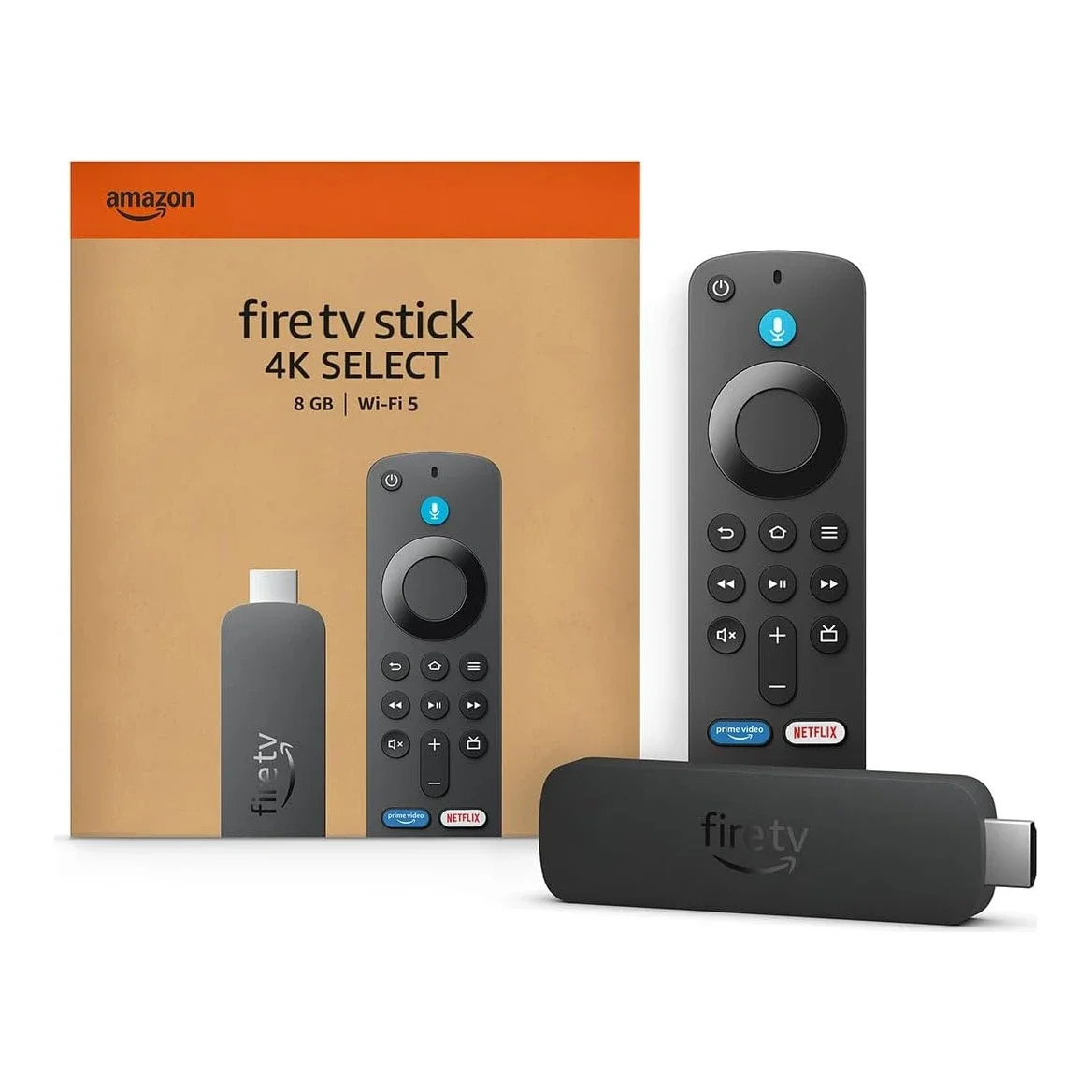
Amazon Fire TV Stick 4K Select
Product ID: AKS-20261019-3ZCU
The Amazon Fire TV Stick 4K Select is Amazon's entry-level 4K streaming stick: plug it into an HDMI port, join Wi-Fi, and stream Prime Video, Netflix, YouTube, Disney+ and more, or play cloud games through Xbox Game Pass and Luna. It outputs 4K at 60fps with HDR10, HDR10+ and HLG, decodes H.265, VP9 and AV1, and passes Dolby audio through over HDMI (no Dolby Vision). Quad-core 1.7GHz, 8GB storage, dual-band MIMO Wi-Fi 5, Bluetooth 5.0, and an Alexa Voice Remote in the box. Launched in 2025; #1 in Amazon Japan's electronics best sellers and #11 in the US. Note that Alexa+ needs a US account, and Amazon already flags a newer model (the 2026 Fire TV Stick 4K).
Saved temporarily in this device’s browser only. No long-term storage or syncing.
Official list prices
Pending and starting prices do not confirm the price of a specific variant. Check each market’s currency and tax status.
No verified official price available
Product information
- Brand:
- Amazon
- Category:
- Streaming media player
- Product line:
- Fire TV
- Release date:
- 2025 (year only)
- Product ID:
- AKS-20261019-3ZCU
- Official information:
- View manufacturer page
- Last updated:
- Oct 29, 2026
Specifications
Body
- Width
- 99 mm
- Height
- 30 mm
- Depth
- 14 mm
- Weight
- 42 g
Performance & system
- Chipset
- Quad-core 1.7GHz
- Storage
- 8 GB
Imaging
- Maximum output resolution
- 2160p (4K Ultra HD); also 1080p and 720p
- Maximum output frame rate
- 60 fps
- HDR formats
- HDR10, HDR10+, HLG
- Video codecs
- H.265, H.264, VP9, AV1
Audio
- Audio formats
- HDMI pass-through of Dolby-encoded audio (AC-3, E-AC-3, E-AC3_JOC)
Connectivity & compatibility
- Ports
- HDMI output, micro-USB (power only)
- Wireless connectivity
- Dual-band, dual-antenna Wi-Fi (MIMO), 802.11a/b/g/n/ac
- Bluetooth version
- 5.0 + LE
Product reviews
Insufficient reviews · 3 reviews. Overall ratings appear after at least 3 independent sources. Existing reviews remain available.
Austin Evans: Fire TV Stick 4K Select Review — Ad-Choked Home Screen, Tiny 8GB Storage, Slow Boots
Machine translated · Original language: Chinese (Taiwan) · Source language: Chinese (Taiwan)
Source
Austin Evans
Key Takeaways
- Home screen is an aggressive billboard choked with sponsored banners, autoplay trailers, and Prime promotions that cannot be disabled.
- Puny 8GB flash storage leaves barely 4.5GB usable after OS; fills up instantly with five apps and cached thumbnails, triggering low-space alerts.
- OS accumulates sluggish bloat over months of usage, causing menu navigation to stall and drop frames under normal multitasking.
- Employs an obsolete Micro-USB power cable instead of USB-C, refusing to boot reliably from standard low-wattage TV USB ports.
✅ Pros
- Bargain basement pricing during sales makes it great for old TVs
- Comprehensive support for Dolby Vision, HDR10+, and Dolby Atmos
- Convenient Alexa remote controls TV volume and power via infrared
❌ Cons
- Home launcher is a commercial billboard pushing unwanted promos
- Pitiful 8GB internal storage triggers constant cleanup warnings
- System responsiveness bogs down and stutters over time
- Relies on obsolete Micro-USB port for power delivery
📝 Verdict
"A dirt-cheap 4K streamer compromised by an ad-infested UI, anemic 8GB storage, and sluggish long-term performance."
View original
Austin Evans:系統滿版廣告極度擁擠,僅 8GB 儲存空間且開機啟動緩慢
來源
Austin Evans
重點摘要
- 首頁超過一半以上的版面被亞馬遜強推的贊助廣告與自家串流促銷影片強行霸佔,視覺極其混亂雜亂且無法手動關閉隱藏。
- 內建儲存空間依然吝嗇地停留在 8GB,扣除系統底層佔用後僅剩約 4.5GB,安裝五六個大型串流 App 與快取後便頻繁跳出「空間不足」警告。
- 使用超過半年後系統背景快取累積,開機載入與切換 App 延遲明顯增加,操作反應偶爾出現長達兩秒的卡頓假死。
- 依然使用陳舊的 Micro-USB 供電接口而非 Type-C,且必須外接專用插頭供電,電視內建 USB 供電常因瓦數不足無法啟動。
✅ 優點
- 特價促銷時性價比極高適合老電視升級
- 支援 Dolby Vision 與 Dolby Atmos 規格完整
- 遙控器整合電視電源與音量紅外線控制
❌ 缺點
- 首頁鋪天蓋地廣告推送侵擾視覺體驗
- 僅 8GB 儲存空間極易爆滿無法裝軟體
- 長期使用系統容易卡頓延遲掉幀
- 仍採用淘汰的 Micro-USB 供電接口
📝 總結評語
「價格便宜硬體解碼全面,但滿屏的廣告強推與捉襟見肘的 8GB 空間,讓人深刻體會一分錢一分貨。」
This AI-generated summary is based on the original source and was not written by its creator. It may contain errors or omissions; please consult the original source.
CFL-TECH: Usable, but a bit expensive at US$40
Machine translated · Original language: Chinese (Taiwan)
Source
- Video: Amazon Fire TV Stick 4K 2025 "SELECT" REVIEW⁉️
- Channel: CFL-TECH | Type: Professional review | Based on: YouTube transcript
Key points
- Setup takes about 3–4 minutes, and it's smoother if you already have other Fire TV devices; it uses the familiar Fire TV UI, running Vega OS 1.1
- At US$40 it's positioned as entry-level 4K; it has only 1GB of memory, less than the Max (8GB more storage, 2GB of memory), which costs only US$20 more
- The program guide, Prime Video and Live channels run smoothly, but the remote's buttons are too "clicky," which he dislikes
- App support is currently limited, and the program guide didn't carry over after syncing, which lowers his score
- He rates it 6.5–6.8 out of 10 and suggests waiting for a Black Friday discount before buying
✅ Pros
- Works fine
- Familiar interface
- Quick setup
❌ Cons
- Limited app support
- Poor-feeling remote buttons
- List price on the high side
📝 Verdict
It works and gets the job done, but at US$40 the value isn't quite there; he suggests waiting for a price drop.
View original
CFL-TECH:堪用,但 40 美元有點貴
來源
- 影片:Amazon Fire TV Stick 4K 2025 "SELECT" REVIEW⁉️
- 頻道:CFL-TECH|類型:專業評測|摘要依據:YouTube 字幕逐字稿
重點摘要
- 設定約 3–4 分鐘,若已有其他 Fire TV 裝置會更順;介面沿用熟悉的 Fire TV UI,系統為 Vega OS 1.1
- 40 美元定位入門 4K;只有 1GB 記憶體,比 Max(多 8GB 儲存、2GB 記憶體)少,Max 只貴 20 美元
- 節目表、Prime Video 與 Live 頻道操作順暢,但遙控器按鍵太『喀喀』響,他不喜歡
- 目前 App 支援有限,同步後節目表沒有帶入,拉低評分
- 他自評 6.5–6.8 分(滿分 10),建議等黑色星期五折扣再買
✅ 優點
- 可正常使用
- 介面熟悉
- 設定快
❌ 缺點
- App 支援有限
- 遙控器按鍵手感差
- 原價偏高
📝 總結評語
這台可以用、也能完成工作,但以 40 美元來說價值還不夠,建議等降價。
This AI-generated summary is based on the original source and was not written by its creator. It may contain errors or omissions; please consult the original source.
Cord Cutters News: Tested with his own money, and recommended for regular users
Machine translated · Original language: Chinese (Taiwan)
Source
- Video: Review: Amazon Fire TV Stick 4K Select (newest model), start streaming in 4K, AI-powered search
- Channel: Cord Cutters News | Type: Professional review | Based on: YouTube transcript
Key points
- He bought it with his own money to test; it's the first Fire TV that no longer runs Android, switching instead to Vega OS, Amazon's own Linux-based platform, while the interface looks almost the same as before
- The box includes the remote, batteries, an HDMI extender and a USB cable, so you don't need to buy accessories; scan a QR code to link your account, enter your Wi-Fi password, and you can start streaming within 5 minutes
- YouTube, the program guide and Prime Video all load quickly, and he's happy with the performance; the 4K Max performs noticeably better, but most people will barely notice the difference
- Mainstream apps such as Netflix, YouTube, Prime Video, Disney+, HBO Max and YouTube TV all work; a few niche apps aren't supported yet
- Since it's no longer Android, you can't sideload Android apps, which is a downside for people used to sideloading
✅ Pros
- Quick, simple setup
- All mainstream streaming apps work
- Smooth operation
- Complete set of accessories
❌ Cons
- Can't sideload Android apps
- Some niche apps not yet supported
📝 Verdict
It does what it says and runs reliably; he gives it two thumbs up and recommends it, and an entry-level 4K option also has more long-term value than buying only the HD version.
View original
Cord Cutters News:自掏腰包實測,推薦給一般使用者
來源
- 影片:Review: Amazon Fire TV Stick 4K Select (newest model), start streaming in 4K, AI-powered search
- 頻道:Cord Cutters News|類型:專業評測|摘要依據:YouTube 字幕逐字稿
重點摘要
- 他自費購買實測;這是第一款不再跑 Android、改用 Amazon 自家 Linux 架構 Vega OS 的 Fire TV,介面外觀與以往幾乎相同
- 盒內附遙控器、電池、HDMI 延長線與 USB 線,不需另購配件;掃 QR Code 綁帳號、輸入 Wi-Fi 密碼,5 分鐘內就能開始串流
- YouTube、節目表、Prime Video 載入都很快,他對效能很滿意;4K Max 效能明顯更好,但一般人感受差距很小
- Netflix、YouTube、Prime Video、Disney+、HBO Max、YouTube TV 等主流 App 都正常;少數小眾 App 尚未支援
- 不再是 Android,無法側載(sideload)Android App,對習慣側載的人是缺點
✅ 優點
- 設定簡單快速
- 主流串流 App 都能用
- 操作流暢
- 配件齊全
❌ 缺點
- 無法側載 Android App
- 部分小眾 App 尚未支援
📝 總結評語
它說到做到、運作穩定,他給兩個讚並推薦;入門 4K 選擇也比只買 HD 版更有長遠價值。
This AI-generated summary is based on the original source and was not written by its creator. It may contain errors or omissions; please consult the original source.