
No photos recorded for this color yet
Apple Mac Studio (M5 Max / M5 Ultra)
Product ID: AKS-20261009-XUNY
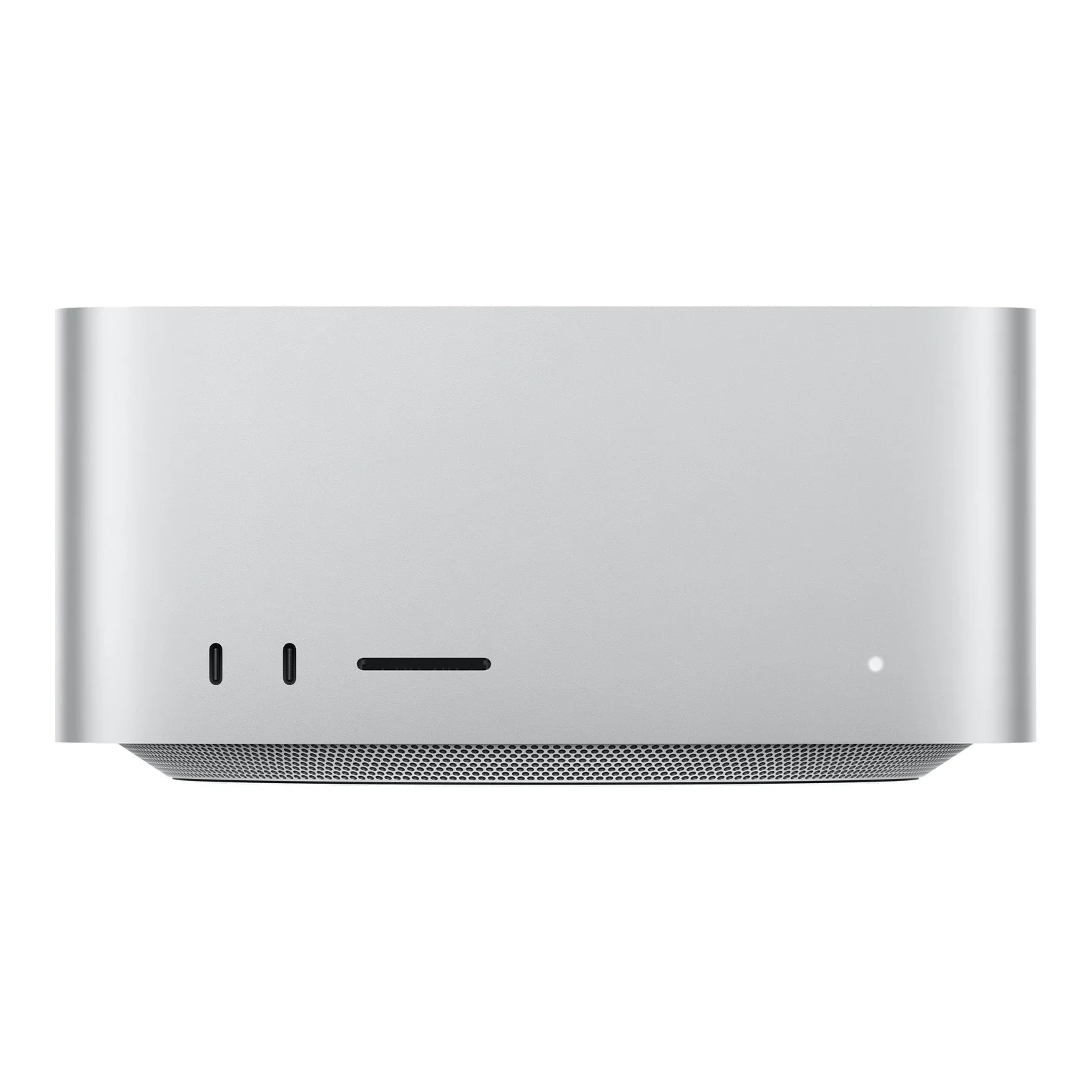
The Apple Mac Studio (M5 Max/M5 Ultra) is Apple's high-performance desktop workstation, refreshed in 2026, measuring 19.7×19.7×9.5cm in Silver. Choose M5 Max (18-core CPU with 6 super and 12 performance cores; 32- or 40-core GPU; 460/614GB/s memory bandwidth) or M5 Ultra (30- or 36-core CPU; 64- or 80-core GPU; 32-core Neural Engine; 1.2TB/s). The back has four Thunderbolt 5 ports, two USB-A, HDMI 2.1, 10Gb Ethernet and a 3.5mm headphone jack; the front has SDXC (UHS-II) plus two USB-C (M5 Max) or two Thunderbolt 5 (M5 Ultra) ports. Apple N1 provides Wi-Fi 7, Bluetooth 6 and Thread, with up to five (M5 Max) or eight (M5 Ultra) external displays. Unified memory starts at 36GB, up to 128GB on M5 Max, and from 96GB up to 512GB on M5 Ultra (512GB configurations ship in late October 2026); SSD runs 512GB to 16TB. It weighs 2.73kg (M5 Max) or 3.64kg (M5 Ultra), with 480W maximum continuous power. Released 2026-09-22; from NT$84,900 on Apple Taiwan, with M5 Ultra models from NT$199,900.
Saved temporarily in this device’s browser only. No long-term storage or syncing.
Official list prices
Pending and starting prices do not confirm the price of a specific variant. Check each market’s currency and tax status.
Taiwan (TW) · 1 TWD 84,900
-
Starting at
TWD 84,900 TW
Product price · Tax included
Official source · Checked
官方定價:NT$84,900 起
Product information
- Brand:
- Apple
- Category:
- Desktop computer
- Product line:
- Mac Studio
- Release date:
- 2026-09-22
- Product ID:
- AKS-20261009-XUNY
- Official information:
- View manufacturer page
- Last updated:
- Oct 31, 2026
Specifications
Body
- Width
- 197 mm
- Height
- 95 mm
- Depth
- 197 mm
Performance & system
- Processor
- Apple M5 Max (18-core CPU) or M5 Ultra (30- or 36-core CPU)
- Graphics processor
- M5 Max 32- or 40-core GPU; M5 Ultra 64- or 80-core GPU
- Memory type
- Unified memory (36GB–128GB on M5 Max; 96GB–512GB on M5 Ultra)
- Storage type
- SSD, 512GB–16TB
- Operating system
- macOS
- Form factor
- Compact desktop
Connectivity & compatibility
- Ports
- Back: 4× Thunderbolt 5, 2× USB-A, HDMI 2.1, 10Gb Ethernet, 3.5mm jack; front: SDXC (UHS-II) + 2× USB-C (M5 Max) or 2× Thunderbolt 5 (M5 Ultra)
- Wireless connectivity
- Apple N1: Wi-Fi 7, Thread
- Bluetooth version
- 6
Battery & power
- Power supply rating
- 480 W
Product reviews
Based on 4 reviews
Based on a limited sample of reviews.
Dave2D: Mac Studio (M5 Max/Ultra) Review — Idle Fan Hum & Zero Internal Upgradability
Machine translated · Original language: Chinese (Taiwan) · Source language: Chinese (Taiwan)
Source
Dave2D
Key Takeaways
- Twin blower fans run at a constant mandatory ~1,300 RPM minimum, producing a low-frequency hum in dead-silent audio studios.
- Completely sealed appliance architecture prevents any post-purchase upgrades to internal storage, RAM, or PCIe expansion cards.
- At 9.5cm tall, it is a chunky desktop block that cannot tuck invisibly beneath most computer display stands.
- Even when spending thousands on top-tier Ultra models, Apple stingily omits any bundled HDMI or Thunderbolt cable.
✅ Pros
- Peerless multi-stream 8K video rendering speeds
- Essential front-facing SD card slot and Thunderbolt I/O
- Astonishing energy efficiency drawing a fraction of PC rigs
❌ Cons
- Constant low-frequency fan hum in silent rooms
- Zero post-purchase hardware modularity or expansion
- Bulky 9.5cm height will not fit under monitor risers
- No bundled Thunderbolt cable at astronomical pricing
📝 Verdict
"Mac Studio is a creative powerhouse marred by persistent idle fan hum, zero modularity, and typical Apple stinginess."
View original
Dave2D:待機時風扇依然恆定低鳴,昂貴定價且完全無法自行擴充硬體
來源
Dave2D
重點摘要
- 內部雙離心風扇採用恆定最低轉速(約 1,300 RPM)常駐運轉,在極端安靜的錄音室或夜間環境中會發出持續的低頻風噪嗡鳴。
- 整機零組件全部焊死封裝,高達四千美元以上的旗艦電腦竟然無法更換或擴充任何內部記憶體與 PCIe 擴充卡。
- 機身高度達 9.5 公分,在桌面上存在感較重,無法像 Mac mini 那樣輕鬆隱藏在螢幕底座下方。
- 選配 M5 Ultra 頂規款售價高達數千美元,原廠包裝盒內依然連一條原廠 HDMI 或 Thunderbolt 傳輸線都捨不得附贈。
✅ 優點
- M5 Max/Ultra 頂級影片渲染輸出速度天下無敵
- 前方配置 SD 卡槽與雙 Thunderbolt 孔極致便利
- 整機重載功耗極低發熱控制頂級
❌ 缺點
- 安靜環境下風扇常駐低頻運轉噪音
- 零內部擴充升級性完全無法改動
- 機身厚度較高無法藏於螢幕下方
- 數千美元售價卻未附贈傳輸線材
📝 總結評語
「Mac Studio 性能無可挑剔,但常駐風扇聲、不可升級性與高昂配件稅,依舊展現出蘋果一貫的固執傲慢。」
This AI-generated summary is based on the original source and was not written by its creator. It may contain errors or omissions; please consult the original source.
Brian Tong: The M5 Ultra Mac Studio's performance is so absurd it leaves you speechless, but most people won't need it
Machine translated · Original language: Chinese (Taiwan)
Source
- Video: M5 Ultra Mac Studio Review - The Most Powerful Mac EVER Made! Do You Need It?
- Channel: Brian Tong | Type: Full review (M5 Ultra, 256GB, 4TB) | Based on: YouTube transcript (fetched with youtube-transcript-api)
Key points
- The review unit has an M5 Ultra (36-core CPU, 80-core GPU, 32-core Neural Engine), 256GB of unified memory (512GB optional later) and a 4TB SSD, priced at $12,299 in the US; the M5 Ultra starts at $5,499, and the M5 Max version at $2,499.
- Ports: 2 Thunderbolt 5 ports and an SD card slot on the front; 4 Thunderbolt 5 ports, 10Gb Ethernet, 2 USB-A ports, HDMI and a headphone jack on the back.
- Exporting a 13-minute video in Premiere: the M6 Mac mini takes 4 min 32 s, the M2 Ultra 2 min 15 s, and the M5 Ultra just 1 min 33 s; on a 45-minute project with 15 audio/video layers, the M6 Mac mini takes 19 min 10 s while the M5 Ultra takes only 5 min 17 s.
- He admits he doesn't really need such a powerful machine, but some people will still buy it because it's Apple's most powerful computer; he thinks Apple is positioning the Mac Studio as the next frontier for local AI computing.
- The top spec (256GB, 16TB) costs about $18,299 without AppleCare. He has no criticism of the machine at all — it's just unbelievably powerful.
✅ Pros
- Astonishing video export speed
- A full set of ports (6 Thunderbolt 5, 10Gb Ethernet)
- Well suited to local AI computing
❌ Cons
- Extremely expensive in high-end configurations
- Most people won't use this much performance
📝 Verdict
The most powerful Mac Apple has ever made: as long as you can make full use of it, the M5 Ultra Mac Studio is flawless hardware.
View original
Brian Tong:M5 Ultra Mac Studio 效能誇張到讓人說不出話,但多數人用不到
來源
- 影片:M5 Ultra Mac Studio Review - The Most Powerful Mac EVER Made! Do You Need It?
- 頻道:Brian Tong|類型:完整評測(M5 Ultra、256GB、4TB)|摘要依據:YouTube 字幕逐字稿(youtube-transcript-api 擷取)
重點摘要
- 評測機為 M5 Ultra(36 核心 CPU、80 核心 GPU、32 核心神經網路引擎)、256GB 統一記憶體(之後可選 512GB)與 4TB SSD,美國售價 12,299 美元;M5 Ultra 起價 5,499 美元,M5 Max 版本 2,499 美元起。
- 連接埠:正面 2 個 Thunderbolt 5 與 SD 卡槽,背面 4 個 Thunderbolt 5、10Gb 乙太網路、2 個 USB-A、HDMI 與耳機孔。
- Premiere 匯出 13 分鐘影片:M6 Mac mini 4 分 32 秒、M2 Ultra 2 分 15 秒,M5 Ultra 只要 1 分 33 秒;45 分鐘、15 層影音的專案,M6 Mac mini 19 分 10 秒,M5 Ultra 僅 5 分 17 秒。
- 他坦言自己其實不需要這麼強的機器,但仍會有人因為它是 Apple 最強的電腦而購買;他認為 Apple 正把 Mac Studio 定位為本地 AI 運算的下一個前線。
- 頂規(256GB、16TB)不含 AppleCare 約 18,299 美元。他對這台機器沒有任何批評,只覺得強到不可思議。
✅ 優點
- 影片匯出速度驚人
- 連接埠齊全(6 個 Thunderbolt 5、10Gb 乙太網路)
- 適合本地 AI 運算
❌ 缺點
- 高階配置價格極高
- 多數人用不到這等效能
📝 總結評語
Apple 有史以來最強的 Mac:只要你能充分利用,M5 Ultra Mac Studio 是無可挑剔的硬體。
This AI-generated summary is based on the original source and was not written by its creator. It may contain errors or omissions; please consult the original source.
Mark Ellis: Turning the M5 Ultra Mac Studio into the company's private AI server
Machine translated · Original language: Chinese (Taiwan)
Source
- Video: M5 Ultra Mac Studio Review: Goodbye Claude?
- Channel: Mark Ellis Reviews | Type: Practical use review (M5 Ultra, 256GB, 4TB) | Based on: YouTube transcript (fetched with youtube-transcript-api)
Key points
- The test unit has an M5 Ultra (36-core CPU, 80-core GPU, 32-core Neural Engine), 256GB of unified memory (1.2TB/s bandwidth) and a 4TB SSD; the design and ports are largely the same as the previous generation, including 6 Thunderbolt 5 ports, an SD card slot and 2 USB-A ports.
- He loads multiple local large language models on the Mac Studio (the largest with 116 billion parameters), then queries them remotely from a laptop or phone via Tailscale, without going through any cloud AI provider.
- He demonstrates querying company data and transcripts of the channel's 50 most recent videos, getting answers within seconds; it can also write code while offline.
- He admits he isn't an expert and is learning as he goes; for their studio, he would choose a lower-spec Mac Studio than this one, since this one costs $12,000.
- But for businesses with heavy workloads spending big on cloud AI tokens every year, buying the hardware outright is a very cost-effective decision by comparison.
✅ Pros
- Can be used remotely as a private AI server
- Large memory runs very large models
- Data stays local, with no token fees
❌ Cons
- Extremely expensive at top spec
- Setting up local AI involves a learning curve
📝 Verdict
An ideal machine for on-premises business AI: if you spend significantly on cloud AI every year, the one-time investment in an M5 Ultra Mac Studio is well worth considering.
View original
Mark Ellis:把 M5 Ultra Mac Studio 變成公司的私有 AI 伺服器
來源
- 影片:M5 Ultra Mac Studio Review: Goodbye Claude?
- 頻道:Mark Ellis Reviews|類型:實務應用評測(M5 Ultra、256GB、4TB)|摘要依據:YouTube 字幕逐字稿(youtube-transcript-api 擷取)
重點摘要
- 測試機為 M5 Ultra(36 核心 CPU、80 核心 GPU、32 核心神經網路引擎)、256GB 統一記憶體(1.2TB/s 頻寬)與 4TB SSD;外觀與連接埠和前代大致相同,包含 6 個 Thunderbolt 5、SD 卡槽與 2 個 USB-A。
- 他在 Mac Studio 上載入多個本地大型語言模型(最大 1,160 億參數),再透過 Tailscale 從筆電或手機遠端連線查詢,完全不經過雲端 AI 業者。
- 示範查詢公司資料與頻道最近 50 支影片的逐字稿,數秒內就能給出答案;也能在不連網的狀態下寫程式。
- 他自認不是專家、邊學邊做;以他們的工作室來說會選比這台規格低的 Mac Studio,因為這台要 12,000 美元。
- 但對每年在雲端 AI token 上花大錢、工作量很重的企業來說,買斷硬體的成本相比之下是很划算的決定。
✅ 優點
- 可當作私有 AI 伺服器遠端使用
- 大記憶體能跑超大模型
- 資料留在本地,不必付 token 費用
❌ 缺點
- 頂規價格極高
- 設定本地 AI 需要一定學習成本
📝 總結評語
企業本地 AI 的理想主機:若你每年在雲端 AI 上花費可觀,M5 Ultra Mac Studio 的一次性投資很值得考慮。
This AI-generated summary is based on the original source and was not written by its creator. It may contain errors or omissions; please consult the original source.
Alex Ziskind: The M5 Ultra processes local AI prompts 2–4x faster, but it's louder, hotter and pricier
Machine translated · Original language: Chinese (Taiwan)
Source
- Video: M5 Ultra… Apple Wasn’t Messing Around
- Channel: Alex Ziskind | Type: Developer and local AI testing (vs. M3 Ultra) | Based on: YouTube transcript (fetched with youtube-transcript-api)
Key points
- He tested the M5 Ultra (80-core GPU, 256GB, 8TB, about $14,299 in the US) side by side with his own M3 Ultra, with both running the same versions of llama.cpp, MLX and model files. The M5 Ultra's 36 CPU cores are 12 super cores + 24 performance cores, with no efficiency cores.
- Speedometer rises from the M3 Ultra's 47 to 60.2; he thinks this machine is overkill for pure development tasks.
- Memory bandwidth: the CPU-side STREAM test measured 583.6GB/s (M3 Ultra: 312.9GB/s); the GPU side measured 1,039GB/s, about 85% of the official 1.2TB/s and about 1.4 times the M3 Ultra.
- Local AI: token generation is about 1.5 times faster and prompt processing 2–4 times faster, which is clearly noticeable with coding agents; with 8 concurrent requests it does 134 tokens/s versus the M3 Ultra's 75.
- The cost: power draw exceeds 400W at full GPU load (M3 Ultra: about 200W), the fans are clearly audible and the chassis runs hotter; tokens per watt improve by only about 12%, and the price is clearly higher.
✅ Pros
- Big gains in local AI prompt processing
- Significantly higher measured memory bandwidth
- All CPU cores are high-performance cores
❌ Cons
- Louder and hotter at full load
- Much higher power draw
- Higher price
📝 Verdict
A real upgrade for local AI users: the jump in prompt processing speed in particular is very noticeable for AI coding agents, but you have to accept the higher price and noise.
View original
Alex Ziskind:M5 Ultra 本地 AI 提示處理快 2~4 倍,但更吵、更熱也更貴
來源
- 影片:M5 Ultra… Apple Wasn’t Messing Around
- 頻道:Alex Ziskind|類型:開發者與本地 AI 實測(對比 M3 Ultra)|摘要依據:YouTube 字幕逐字稿(youtube-transcript-api 擷取)
重點摘要
- 他把 M5 Ultra(80 核心 GPU、256GB、8TB,美國約 14,299 美元)與自購的 M3 Ultra 並排測試,兩台使用相同版本的 llama.cpp、MLX 與模型檔。M5 Ultra 的 36 個 CPU 核心為 12 個超級核心+24 個效能核心,沒有節能核心。
- Speedometer 從 M3 Ultra 的 47 提升到 60.2;他認為單純做開發任務的話,這台是大材小用。
- 記憶體頻寬:CPU 端 STREAM 測試 583.6GB/s(M3 Ultra 312.9GB/s);GPU 端實測 1,039GB/s,約為官方 1.2TB/s 的 85%,是 M3 Ultra 的約 1.4 倍。
- 本地 AI:token 生成約快 1.5 倍、提示處理快 2~4 倍,對程式碼代理感受明顯;8 個並行請求時 134 tokens/s 對 M3 Ultra 的 75。
- 代價:GPU 滿載時功耗超過 400W(M3 Ultra 約 200W),風扇明顯可聽見、機身更燙;每瓦 token 數僅提升約 12%,售價也明顯上漲。
✅ 優點
- 本地 AI 提示處理大幅提升
- 記憶體頻寬實測顯著提高
- CPU 核心全為高效能核心
❌ 缺點
- 滿載時更吵更熱
- 功耗大幅增加
- 價格上漲
📝 總結評語
本地 AI 用戶的實質升級:特別是提示處理速度的提升,對寫程式的 AI 代理很有感,但要接受更高的價格與噪音。
This AI-generated summary is based on the original source and was not written by its creator. It may contain errors or omissions; please consult the original source.