
No photos recorded for this color yet
Razer Blade 18 (2026, RZ09-0582)
Product ID: AKS-20261011-33WJ
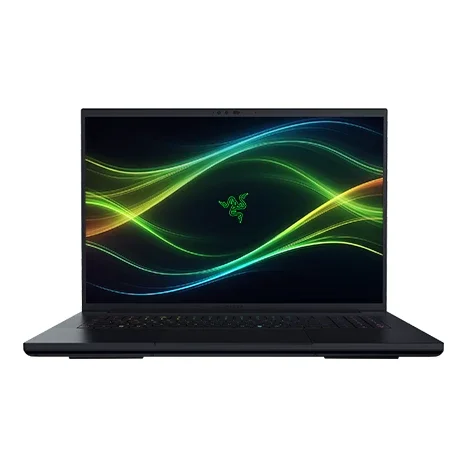
The Razer Blade 18 (2026, RZ09-0582) is Razer's most powerful desktop replacement, weighing 3.2kg at 22.79–28.7mm thick. It pairs an Intel Core Ultra 9 290HX Plus (24 cores, up to 5.5GHz) with an RTX 5070 Ti / 5080 / 5090 Laptop GPU (up to 175W TGP on the 5080 / 5090). The 18-inch dual-mode display switches between UHD+ at 240Hz and FHD+ at 440Hz, now at 600 nits; memory returns to DDR5-6400 SO-DIMM, upgradeable to 128GB, with two M.2 slots (one PCIe 5.0). I/O includes Thunderbolt 5, Thunderbolt 4, 3× USB-A, HDMI 2.1, 2.5GbE and UHS-II SD, plus a 5MP IR camera with a privacy shutter, a 99Wh battery and a 400W adapter. Versus the 2025 model the main changes are the CPU and display brightness, and it costs more.
Saved temporarily in this device’s browser only. No long-term storage or syncing.
Official list prices
Pending and starting prices do not confirm the price of a specific variant. Check each market’s currency and tax status.
No verified official price available
Product information
- Brand:
- Razer
- Category:
- Laptop
- Product line:
- Razer Blade
- Release date:
- 2026 (year only)
- Product ID:
- AKS-20261011-33WJ
- Official information:
- View manufacturer page
- Last updated:
- Oct 29, 2026
Specifications
Body and display
- Width
- 399.96 mm
- Depth
- 275.4 mm
- Minimum height
- 22.79 mm
- Maximum height
- 28.7 mm
- Weight
- 3.2 kg
- Display count
- 1
- Display size
- 18 in
- Display resolution
- 3840 × 2400 (dual mode switchable to 1920 × 1200)
- Display technology
- Dual-mode panel 16:10 (UHD+ 240Hz / FHD+ 440Hz, 3ms, 600 nits, 100% DCI-P3, Calman verified)
- Refresh rate
- 240 Hz
- Touchscreen
- No
Performance and storage
- Operating system
- Windows
- OS version
- 11 Home
- Processor
- Intel Core Ultra 9 290HX Plus (24 cores, up to 5.5GHz, 36MB cache)
- Graphics
- NVIDIA GeForce RTX 5070 Ti 12GB (up to 140W + 15W) / RTX 5080 16GB / RTX 5090 24GB (up to 175W incl. 25W Dynamic Boost) GDDR7 (by configuration)
- NPU
- Intel NPU, up to 13 TOPS
- Memory type
- DDR5-6400 SO-DIMM ×2 (32 / 64 / 128GB, upgradeable to 128GB)
- Storage type
- PCIe 4.0 NVMe M.2 SSD (1TB / 2TB); 2× M.2 slots, up to 8TB (Gen4) / 4TB (Gen5, one slot only)
Power and connectivity
- Battery capacity
- 99 Wh
- Power adapter
- 400 W
- Ports
- 1× Thunderbolt 5 (USB-C, DP 2.1 via dGPU, 100W PD), 1× Thunderbolt 4 (USB-C, DP 2.1, 100W PD), 3× USB 3.2 Gen 2 Type-A, 1× HDMI 2.1, 1× 2.5GbE RJ-45, UHS-II SD card reader, 1× 3.5mm combo jack, power port
- Wireless
- Wi-Fi 7 (802.11be tri-band 2×2); Bluetooth 5.4
- Camera
- 5MP IR camera (Windows Hello) with privacy shutter
- Color
- Black
Product reviews
Based on 4 reviews
Based on a limited sample of reviews.
Dave2D: Razer Blade 18 (2026) Review — 3.2kg Desktop Anchor, 90-Minute Battery, Proprietary Plug
Machine translated · Original language: Chinese (Taiwan) · Source language: Chinese (Taiwan)
Source
Dave2D
Key Takeaways
- Weighs an astonishing 3.2kg on its own, exceeding 4.3kg with the charging brick, acting like a backpack anchor.
- Off-wall battery life is virtually non-existent, collapsing within 90 to 120 minutes under basic tasks.
- Still mandates Razer's bulky proprietary reversible charging port; USB-C cannot supply full gaming wattage.
- $4,000+ price tag, yet the black anodized aluminum surface remains a horrific, un-cleanable fingerprint oil magnet.
✅ Pros
- Colossal 18-inch dual-mode 4K/FHD visual battlefield
- Peerless CNC milled aluminum tank-like chassis
- Vast vapor chamber covers full-power graphics
❌ Cons
- 4.3kg combined total carry weight
- Pathetic 90-minute unplugged endurance
- Clunky proprietary power connector dependency
- $4,000 fingerprint oil magnet
📝 Verdict
"Blade 18 is a desktop masquerading as a laptop: immense power trapped in an un-portable, $4,000 fingerprint-stained tank."
View original
Dave2D:重達 3.2 公斤的龐然巨物,拔電僅 90 分鐘續航與專屬充電接頭
來源
Dave2D
重點摘要
- 整機重量高達 3.2 公斤,加上龐大專用變壓器總重超過 4.3 公斤,放入背包如同背負沉重啞鈴,毫無便攜性。
- 在 18 吋 4K 雙模式高刷新巨幅螢幕與旗艦顯卡高負載下,離線辦公電池續航僅有可憐的 1.5 到 2 小時。
- 堅持採用特規專屬雙面金屬充電插頭,出門無法使用一般 USB-C PD 充電器提供滿血效能。
- 定價突破四千美元天價,但鋁合金陽極黑化外殼依舊是指紋收集器,輕微觸摸即滿佈頑固油印。
✅ 優點
- 18 吋巨幅 4K/FHD 雙模式電競螢幕視覺極致震撼
- 全金屬 CNC 一體切削機身做工極度紮實
- 散熱均溫板面積覆蓋完整壓制狂暴顯卡
❌ 缺點
- 超過 4.3 公斤背出門如受刑的重量
- 僅 90 分鐘的虛設電池續航
- 限制繁多的特規專屬充電接頭
- 四千美元依舊是指紋收集器
📝 總結評語
「Blade 18 是性能怪獸,但它只是一台帶螢幕的沉重桌機;四千美元天價買來的是背不動的負擔。」
This AI-generated summary is based on the original source and was not written by its creator. It may contain errors or omissions; please consult the original source.
Alex Ziskind: A developer's tests vs. the M5 Max — it wins big at local AI inference and gaming, but still loses to the Mac on huge models and on battery
Machine translated · Original language: Chinese (Taiwan)
Source
- Video: Not even close… M5 Max vs Razer Blade 18
- Channel: Alex Ziskind | Type: Developer performance comparison (vs. MacBook Pro M5 Max) | Based on: YouTube transcript
Key points
- Last year he felt the Blade 18 didn't justify its price; this year, with an RTX 5090 (24GB VRAM) and a new Core Ultra 9, he wanted to reassess it.
- It defaults to balanced mode; whether a Windows laptop is plugged in has a big impact on scores, with performance dropping noticeably on battery, while the Mac is unaffected.
- Compared on developer workloads such as Geekbench, multi-core Python and Visual Studio compiles, each machine wins some.
- Local LLMs: in tools like llama.cpp, the Razer clearly beats the M5 Max in both prompt processing and token generation (e.g., about 169 vs. 95 tok/s on one model).
- But the Mac's large unified memory can run huge models like 122B ones, which a laptop with 24GB of VRAM can't.
- He thinks this year's model is well built, very quiet and has a beautiful screen; it's well worth buying for people who do both gaming and AI work, but make sure to get the 2026 version with the 290HX.
✅ Pros
- Far faster local AI inference than the M5 Max
- A far better gaming experience than the Mac
- Well built and very quiet
- Beautiful screen
❌ Cons
- Performance drops noticeably on battery
- 24GB of VRAM can't run huge models
- Expensive
📝 Verdict
This year's model justifies its price: if your work includes both gaming and local AI, it's a great choice — though huge models remain the Mac's strength.
View original
Alex Ziskind:開發者實測 vs M5 Max——本地 AI 推論與遊戲大勝,但超大模型與電池模式仍輸 Mac
來源
- 影片:Not even close… M5 Max vs Razer Blade 18
- 頻道:Alex Ziskind|類型:開發者效能比較(vs MacBook Pro M5 Max)|摘要依據:YouTube 字幕逐字稿
重點摘要
- 去年他認為 Blade 18 撐不起售價;今年換上 RTX 5090(24GB VRAM)與新 Core Ultra 9,他想重新評估。
- 預設是平衡模式;Windows 筆電插電與否對分數影響很大,拔電後效能明顯下滑,而 Mac 不受影響。
- 用 Geekbench、Python 多核心、Visual Studio 編譯等開發者工作比較,各有勝負。
- 本地 LLM:在 llama.cpp 等工具中,Razer 的 prompt 處理與 token 生成速度都明顯勝過 M5 Max(例如某模型約 169 vs 95 tok/s)。
- 但 Mac 的大容量統一記憶體能跑 122B 這類超大模型,24GB VRAM 的筆電無法做到。
- 他認為今年做工好、非常安靜、螢幕漂亮;同時兼顧遊戲與 AI 工作的人很值得買,但要認明 290HX 的 2026 年版。
✅ 優點
- 本地 AI 推論速度大勝 M5 Max
- 遊戲體驗遠優於 Mac
- 做工好、非常安靜
- 螢幕漂亮
❌ 缺點
- 拔電後效能明顯下降
- 24GB VRAM 跑不了超大模型
- 價格昂貴
📝 總結評語
今年這台撐得起售價:如果你的工作同時包含遊戲與本地 AI,這是很好的選擇;只是超大模型仍是 Mac 的強項。
This AI-generated summary is based on the original source and was not written by its creator. It may contain errors or omissions; please consult the original source.
Notebookcheck: Still the king of 18-inch laptops, but apart from the CPU there's almost nothing new, and it's pricier
Machine translated · Original language: Chinese (Taiwan)
Source
- Video: Razer Blade 18 (2026) Review: Still King, hard to recommend!
- Channel: NotebookcheckReviews | Type: Full review (Core Ultra 9 290HX Plus + RTX 5090) | Based on: YouTube transcript
Key points
- Still one of the fastest laptops, while reliably keeping top-tier hardware in check inside an extremely premium slim chassis; it's fairly quiet even in performance mode (under 50dB).
- The main update is just the Core Ultra 9 290HX Plus, essentially a higher-clocked 275 / 285HX, which makes almost no difference in practice; the CPU peaks at about 160W.
- The RTX 5090 runs at the full 175W, with gaming performance on par with top 18-inch machines like the Alienware 18 Area-51 and Legion 9, but without pulling ahead.
- There's still no Mini LED option, but the dual-mode 4K 240Hz panel remains excellent; with DLSS and Multi Frame Generation, even 4K gaming runs smoothly.
- Battery life is about the same as the 2025 version, but no other 18-inch machine comes close.
- He used the previous model as his main machine for several months; due to rising memory and storage prices, the new version is pricier, and he recommends finding the 2025 version while it's still available.
✅ Pros
- Desktop-class performance
- Still quiet in performance mode
- Excellent dual-mode screen
- Best battery life among 18-inch laptops
❌ Cons
- Little more than a CPU swap
- Higher price
- No Mini LED option
📝 Verdict
An outstanding laptop, but more like an expensive flagship halo product: for people who need it to make money, price may not matter; for everyone else, the 2025 version may be better value.
View original
Notebookcheck:依舊是 18 吋之王,但除了換 CPU 幾乎沒新東西,還更貴了
來源
- 影片:Razer Blade 18 (2026) Review: Still King, hard to recommend!
- 頻道:NotebookcheckReviews|類型:完整評測(Core Ultra 9 290HX Plus+RTX 5090)|摘要依據:YouTube 字幕逐字稿
重點摘要
- 依舊是最快的筆電之一,同時能在極度高級的纖薄機身中可靠地壓住頂級硬體;效能模式下也相當安靜(低於 50 分貝)。
- 主要更新只有 Core Ultra 9 290HX Plus,基本上就是時脈更高的 275/285HX,對實際體驗幾乎沒有差別;CPU 最高約 160W。
- RTX 5090 跑滿 175W,遊戲效能與 Alienware 18 Area-51、Legion 9 等頂級 18 吋機種相當,但沒拉開差距。
- 仍沒有 Mini LED 選項,但雙模式 4K 240Hz 面板依然優秀;搭配 DLSS 與多重影格生成,4K 遊戲也能很流暢。
- 續航和 2025 年版差不多,但沒有其他 18 吋機種能接近。
- 他自己曾把前代當主力機使用好幾個月;受記憶體與儲存漲價影響,新版更貴,建議趁還買得到時找 2025 年版。
✅ 優點
- 桌機級效能
- 效能模式依然安靜
- 雙模式螢幕優秀
- 18 吋中續航最好
❌ 缺點
- 幾乎只換了 CPU
- 價格更高
- 沒有 Mini LED 選項
📝 總結評語
非常出色的筆電,但更像昂貴的旗艦光環產品:需要它來賺錢的人價格可能不是問題,其他人買 2025 年版可能更划算。
This AI-generated summary is based on the original source and was not written by its creator. It may contain errors or omissions; please consult the original source.
Level1Techs: A "monster" that barely counts as a laptop — 24GB of VRAM, upgradable RAM and a great touchpad, for those who don't count the cost
Machine translated · Original language: Chinese (Taiwan)
Source
- Video: A 5090 "Gaming Laptop"... Sure. It's A Lot!
- Channel: Level1Techs | Type: Full review (Core Ultra 9 290HX Plus + RTX 5090, workstation / AI oriented) | Based on: YouTube transcript
Key points
- The RTX 5090 Laptop GPU has 24GB of VRAM (not the desktop card's 32GB), but is very power efficient; he thinks Razer is really targeting AI and work use.
- It has a full-size Ethernet port and a 400W power adapter, and the bottom cover comes off with 12 T5 screws; the RAM is upgradable, and the M.2 slots have thick thermal pads.
- The 5MP camera has a physical privacy shutter, and Windows Hello IR turns off automatically when it's covered.
- The Core Ultra 9 290HX Plus keeps pace with desktop CPUs in many workloads, which he takes as a sign that Intel is regaining its footing.
- Under sustained full load the whole system draws about 280–290W; the machine ran AI tasks continuously for nearly two days.
- The keyboard's roughly 1.5mm travel is very comfortable, and the touchpad is the best Windows touchpad he's used; battery life is surprisingly good. He wishes the Ethernet were 5G / 10G rather than 2.5G.
✅ Pros
- A portable workstation with 24GB of VRAM
- Upgradable RAM, easy to clean and maintain
- Great keyboard and huge touchpad
- CPU performance close to a desktop
❌ Cons
- 7+ lb chassis plus a big power brick
- Only 2.5GbE
- Extremely high price
📝 Verdict
Possibly a great choice for people who don't care about price: solidly built and fun to use, with almost nothing comparable on the market as a portable machine with 24GB of VRAM.
View original
Level1Techs:幾乎稱不上筆電的「怪物」——24GB VRAM、可升級 RAM 與優秀觸控板,適合不計成本的人
來源
- 影片:A 5090 "Gaming Laptop"... Sure. It's A Lot!
- 頻道:Level1Techs|類型:完整評測(Core Ultra 9 290HX Plus+RTX 5090,偏工作站/AI 用途)|摘要依據:YouTube 字幕逐字稿
重點摘要
- RTX 5090 Laptop GPU 有 24GB VRAM(不是桌機版的 32GB),但非常省電;他認為 Razer 其實瞄準 AI 與工作用途。
- 有全尺寸乙太網路孔、400W 變壓器,12 顆 T5 螺絲即可打開底蓋;RAM 可升級,M.2 有厚導熱墊。
- 5MP 鏡頭附實體遮蔽蓋,Windows Hello IR 在遮蔽時會自動關閉。
- Core Ultra 9 290HX Plus 在多項工作負載中與桌機 CPU 不相上下,他認為這顯示 Intel 正在恢復元氣。
- 持續滿載時整機耗電約 280–290W;機器連續跑 AI 任務近兩天。
- 鍵盤鍵程約 1.5mm 很舒服,觸控板是他用過最好的 Windows 觸控板;續航意外不錯。希望乙太網路能是 5G/10G 而非 2.5G。
✅ 優點
- 24GB VRAM 便攜工作站
- RAM 可升級、易於清潔維護
- 鍵盤與超大觸控板很好用
- CPU 效能接近桌機
❌ 缺點
- 7 磅以上機身+大變壓器
- 只有 2.5GbE
- 售價極高
📝 總結評語
對不在乎價格的人來說可能是很好的選擇:做工紮實、使用起來很有樂趣,市面上幾乎沒有可比的 24GB VRAM 便攜機。
This AI-generated summary is based on the original source and was not written by its creator. It may contain errors or omissions; please consult the original source.